
A retail client once called me because their order report had gone from 8 seconds to 14 minutes. Nothing had changed except one thing. A developer had wrapped a tax calculation in a user-defined function and called it for every row in a 3-million-row table. The query looked clean, but it ran one function call per row, and the optimizer could not see inside it.
This is the core of the scalar function vs table valued function SQL Server question. Both are reusable T-SQL objects, but they behave very differently inside an execution plan. Picking the wrong one can quietly cost you CPU, and on Azure SQL Database that means a bigger compute tier and a bigger bill. I have fixed this pattern at several companies.
By the end, you will know how each function type works, how to write and test both, how to convert a slow scalar function into a fast one, and how to secure and monitor them.
Scalar Function vs Table Valued Function SQL Server
What Is a User-Defined Function?
A user-defined function (UDF) is a saved T-SQL routine that accepts parameters and returns a result. Unlike a stored procedure, you call a function inside a query, such as in a SELECT list, a WHERE clause, or a JOIN. If you want the broader comparison first, read this guide on SQL Server functions vs. stored procedures.
SQL Server supports three main kinds:
- Scalar functions return a single value, such as a number, date, or string.
- Inline table-valued functions (iTVF) return a table from a single SELECT statement.
- Multi-statement table-valued functions (MSTVF) return a table built by several statements inside a function body.
Functions have rules. They cannot change data in permanent tables, and they cannot use TRY…CATCH or dynamic SQL. These limits keep them predictable inside queries, but they also limit what you can do.
Pro Tip: In my experience, I decide the function type by asking one question first: does the caller need one value or a set of rows? That answer removes half of the confusion before I write any code.
Scalar Functions Explained
A scalar function takes input parameters and returns exactly one value. It is the right shape for small, repeatable calculations like formatting a phone number or computing a discount. If you need a refresher on syntax, this page on how to create a function in SQL Server covers the basics, and the SQL scalar functions tutorial goes deeper.
Creating a scalar function
Here is a realistic example from an e-commerce database. It calculates sales tax for an order line.
CREATE SCHEMA fn;
GO

CREATE FUNCTION fn.CalcLineTax
(
    @LineTotal DECIMAL(18,2),
    @TaxRate   DECIMAL(5,4)
)
RETURNS DECIMAL(18,2)
AS
BEGIN
    RETURN ROUND(@LineTotal * @TaxRate, 2);
END;
GO
After executing the above query, the scalar function has been created successfully, as shown in the screenshot below.
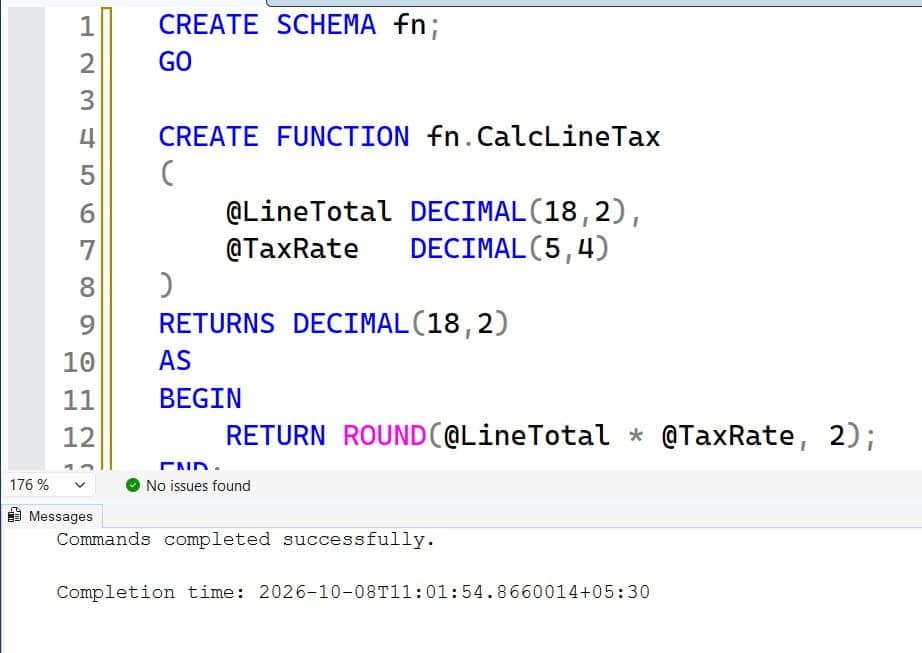
The CREATE SCHEMA statement makes a schema, which is a named container that groups database objects and helps with permissions. Putting functions in a separate fn schema lets you grant access to them as a group. The function takes two parameters, multiplies them, rounds the result, and returns a single DECIMAL.
Call it inside a query like this:
SELECT OrderLineId,
       LineTotal,
       fn.CalcLineTax(LineTotal, 0.0825) AS TaxAmount
FROM   sales.OrderLines
WHERE  OrderId = 10542;
This returns one tax value per order line. For a small filtered set, it performs fine. For more on calling patterns, see how to execute a function in SQL Server with parameters.
Why scalar functions can be slow
Historically, SQL Server executed a scalar function once per row, like a hidden loop. The optimizer treated the function as a black box, so it could not estimate its cost, and it often forced the whole query to run on a single CPU thread (serial execution). On large tables, that is painful.
SQL Server 2019 introduced scalar UDF inlining, which rewrites eligible functions into the main query as an expression. This helps a lot, but it has conditions. The function must avoid features such as certain time-dependent functions, table variables, and some side effects. Inlining also depends on the database compatibility level (150 or higher), and Azure SQL Database supports it. Check eligibility on your version rather than assuming.
SELECT name, is_inlineable
FROM   sys.sql_modules AS m
JOIN   sys.objects AS o ON o.object_id = m.object_id
WHERE  o.type = 'FN';
This query reads the is_inlineable column from the catalog view sys.sql_modules. A value of 1 means SQL Server can inline that function. A value of 0 means it will still run row by row.
Pro Tip: I once found a scalar function marked as not inlineable only because it called GETDATE(). Passing the date in as a parameter fixed it and cut the query from minutes to seconds.
Table-Valued Functions Explained
A table-valued function (TVF) returns a result set that you query like a table. You can join it, filter it, and aggregate it. Read the SQL Server table-valued function guide for the full syntax.
Inline table-valued functions
An inline TVF contains one SELECT statement. SQL Server expands it into the calling query, much like a view that accepts parameters. This gives the optimizer full visibility, so it can use indexes, estimate row counts, and run in parallel.
CREATE FUNCTION sales.GetCustomerOrders
(
    @CustomerId INT,
    @FromDate   DATE
)
RETURNS TABLE
AS
RETURN
(
    SELECT o.OrderId,
           o.OrderDate,
           o.TotalAmount,
           o.Status
    FROM   sales.Orders AS o
    WHERE  o.CustomerId = @CustomerId
      AND  o.OrderDate >= @FromDate
);
GO
This function returns all orders for one customer since a given date. Notice there is no BEGIN…END block and no table definition, because the structure comes from the SELECT itself. It works like a view with parameters, which a normal view cannot offer.
Multi-statement table-valued functions
A multi-statement TVF declares a return table, fills it with several statements, and returns it. It is flexible, but it has a cost. The optimizer historically assumed a fixed low row estimate for the returned table, which led to poor join choices. Newer versions improved this with interleaved execution, but it is not a cure-all. Review the multi-statement table function guide before you use one.
CREATE FUNCTION sales.GetOrderSummary (@CustomerId INT)
RETURNS @Result TABLE
(
    OrderId INT,
    TotalAmount DECIMAL(18,2),
    OrderRank INT
)
AS
BEGIN
    INSERT INTO @Result (OrderId, TotalAmount)
    SELECT OrderId, TotalAmount
    FROM   sales.Orders
    WHERE  CustomerId = @CustomerId;

    UPDATE r
    SET    OrderRank = x.rnk
    FROM   @Result AS r
    JOIN   (SELECT OrderId,
                   RANK() OVER (ORDER BY TotalAmount DESC) AS rnk
            FROM   @Result) AS x
      ON   x.OrderId = r.OrderId;

    RETURN;
END;
GO
This function builds a table variable named @Result, loads it, then updates it with a rank. A table variable is a temporary in-memory-style structure scoped to the batch or function. Here, the same result could be written as one SELECT with a window function, which would convert it to an inline TVF and make it faster.
Pro Tip: Whenever I see an MSTVF, I try to rewrite it as an inline TVF first. About 80 percent of the time, the logic fits in one SELECT, and the execution plan improves immediately.
Scalar Function vs Table-Valued Function: Key Differences
| Feature | Scalar function | Inline TVF | Multi-statement TVF |
|---|---|---|---|
| Returns | One value | A table | A table |
| Used in | SELECT list, WHERE, computed columns | FROM clause, JOIN, APPLY | FROM clause, JOIN, APPLY |
| Optimizer visibility | Limited unless inlined | Full, expanded into the query | Limited, estimated rows |
| Typical performance on big sets | Risky per-row calls | Strong | Moderate to weak |
| Best use | Small formatting or math helpers | Parameterized reusable queries | Complex logic that cannot be one SELECT |
The main trade-off is flexibility versus optimizer visibility. A scalar function is simple to read, but it hides cost. An inline TVF is almost as readable and exposes everything to the optimizer. A multi-statement TVF sits in the middle with extra power and extra risk.
How to Choose the Right Function Type
Use a simple decision path in code reviews. Start with what the caller needs, then check performance.
- If you need one value from simple math or string logic on a small row set, use a scalar function, and confirm it is inlineable.
- If you need rows, use an inline TVF first.
- If the logic needs multiple steps, try a CTE or window functions before accepting an MSTVF.
- If the logic changes data, use a stored procedure instead. You can compare that choice in this article on stored procedures vs. views.
Also consider the data size. A function that is fine on 5,000 rows can crush a reporting query on 50 million rows. Always test at production-like volume, not on a developer’s tiny copy.
Pro Tip: I keep a staging database restored from last night’s backup so I can test functions against real row counts. Small test data hides almost every function performance bug.
Converting a Slow Scalar Function to an Inline TVF
This is the fix I use most often. Suppose a scalar function returns the latest order date for a customer.
CREATE FUNCTION fn.LatestOrderDate (@CustomerId INT)
RETURNS DATE
AS
BEGIN
    DECLARE @d DATE;
    SELECT @d = MAX(OrderDate)
    FROM   sales.Orders
    WHERE  CustomerId = @CustomerId;
    RETURN @d;
END;
GO

SELECT c.CustomerId, fn.LatestOrderDate(c.CustomerId) AS LastOrder
FROM   sales.Customers AS c;
This runs one lookup per customer, which becomes a hidden loop. Here is the inline TVF version, called with CROSS APPLY:
CREATE FUNCTION sales.LatestOrderDateTvf (@CustomerId INT)
RETURNS TABLE
AS
RETURN
(
    SELECT MAX(OrderDate) AS LastOrder
    FROM   sales.Orders
    WHERE  CustomerId = @CustomerId
);
GO

SELECT c.CustomerId, x.LastOrder
FROM   sales.Customers AS c
OUTER APPLY sales.LatestOrderDateTvf(c.CustomerId) AS x;
APPLY runs the function against each row from the left side, but the optimizer expands the logic into the main plan, so it can pick a join strategy. Use OUTER APPLY to keep customers with no orders, similar to a left join. Understanding join types helps you choose between APPLY and a plain join.
For this pattern, a plain GROUP BY join may be even faster. Compare plans. The best result depends on your data, so measure both.
Check the execution plan and indexes
Turn on the actual execution plan in SSMS and look for these signs of trouble:
- A Compute Scalar operator calling a function with a very high estimated subtree cost.
- A serial plan where you expected parallelism.
- Scans on large tables inside the function.
Then support the function with the right index. For the example above, an index on CustomerId that includes OrderDate removes the scan. Follow these SQL index best practices and learn how to create an index properly.
CREATE NONCLUSTERED INDEX IX_Orders_CustomerId_OrderDate
ON sales.Orders (CustomerId, OrderDate)
INCLUDE (TotalAmount, Status);
This nonclustered index stores a sorted copy of selected columns, so lookups by customer skip a full table scan. Remember the trade-off. Every added index slows INSERT and UPDATE operations a bit, so add only what the plans justify.
Pro Tip: I never add an index just because a function is slow. I check the plan first, because sometimes the real fix is passing a better parameter or removing the function entirely.
Security, Permissions, and Governance
Functions are code, and code needs access control. Apply least privilege, which means giving each account only the rights it needs. Application logins should not be sysadmin or db_owner. A secure setup uses an Entra ID identity or a contained user, and the permissions below.
CREATE USER app_orders_api FROM EXTERNAL PROVIDER;

GRANT EXECUTE ON SCHEMA::fn TO app_orders_api;
GRANT SELECT  ON OBJECT::sales.GetCustomerOrders TO app_orders_api;
CREATE USER ... FROM EXTERNAL PROVIDER maps a Microsoft Entra ID identity, such as a managed identity, to a database user in Azure SQL Database. This avoids storing passwords in a config file. GRANT EXECUTE lets the user call scalar functions in the fn schema, and GRANT SELECT lets the user query the inline TVF, since table-valued functions use SELECT permission. To audit access later, review SQL Server permissions and how to check user permissions on a table.
Test with a non-administrator account. Connect as the app user and confirm that the function works and that unrelated tables stay blocked. For stored procedures, the same approach applies, as shown in this guide on giving permission to execute a stored procedure.
For Azure SQL, also require TLS encrypted connections, prefer private endpoints over public firewall rules, and never open a firewall range from 0.0.0.0 to 255.255.255.255. Enable auditing and Microsoft Defender for SQL so that unusual access to sensitive data raises an alert.
Pro Tip: I once found a scalar function reading a salary table that its callers had no direct rights to, because ownership chaining allowed it. I now review function bodies during every access audit.
Monitoring Function Performance and Cost
You cannot tune what you do not measure. Use these tools:
- Query Store, a built-in feature that records query plans and runtime stats over time. It lets you compare a query before and after a change.
- Query Performance Insight in Azure SQL Database, which shows top CPU consumers.
- Dynamic management views (DMVs), such as
sys.dm_exec_function_stats, which report execution counts and CPU per function.
SELECT OBJECT_NAME(object_id) AS FunctionName,
       execution_count,
       total_worker_time / 1000 AS TotalCpuMs,
       total_elapsed_time / 1000 AS TotalElapsedMs
FROM   sys.dm_exec_function_stats
ORDER BY total_worker_time DESC;
This lists functions ranked by total CPU time. Note that DMV data resets after a restart or failover, so use Query Store for long-term trends. Function stats collection can also depend on your version and settings, so confirm availability in your environment.
Tie this to cost. In Azure SQL Database, high CPU pushes you toward a larger vCore or DTU tier. A vCore model sells compute by virtual cores, and DTU bundles CPU, memory, and I/O into one unit. Fixing one hot function can let you scale down a tier. Set budgets and cost alerts in Azure Cost Management, tag your databases by environment, and review Azure Advisor recommendations monthly.
Pro Tip: After tuning one function, I screenshot nothing and instead record the Query Store CPU numbers before and after in the change ticket. Finance loves that proof of savings.
Safe Deployment and Rollback
Never edit functions directly in production. Keep them in source control and deploy through a pipeline. Always take a backup or confirm point-in-time restore is available before releasing schema changes. Dropping or altering a function can break views, computed columns, and stored procedures that depend on it.
Use CREATE OR ALTER FUNCTION for repeatable deployments, which creates the function if missing or updates it in place. This keeps the permissions you granted earlier. Warn your team that DROP FUNCTION followed by CREATE removes those grants.
Also watch for functions used in computed columns or CHECK constraints. A slow function there runs on every insert and update, which hurts write throughput. Test deployments in a staging copy first, then in production during a low-traffic window.
Performance and Production Readiness Checklist
- Prefer inline logic: Choose inline TVFs over multi-statement versions, and check
is_inlineablefor scalar functions before going live. - Test at real volume: Run functions against production-sized data and read the actual execution plan, not only the estimated one.
- Use least-privilege access: Grant EXECUTE or SELECT on a schema to a Microsoft Entra ID user instead of using
db_owneror SQL passwords. - Avoid functions in WHERE clauses: A function wrapped around an indexed column stops index seeks and forces scans.
- Plan recovery: Confirm backups and point-in-time restore before deployment, and test a restore, not just the schedule.
- Watch cost: Track CPU in Query Store, set budgets, and tag resources so tuning wins show up in Azure cost reports.
Common Errors and Troubleshooting
Here are problems I see most often.
Slow query after adding a function. Open the actual plan and look for a serial plan. Replace the scalar function with an inline TVF or an inline expression.
“Invalid use of a side-effecting operator.” Functions cannot modify permanent tables or use certain statements. Move that logic to a stored procedure, and follow these stored procedure best practices.
Wrong row estimates from an MSTVF. Rewrite it as an inline TVF, or load the data into a temp table first. This article on temp tables vs. table variables explains why the estimates differ.
Row-by-row logic inside a function. Avoid WHILE loops in functions. Replace them with set-based queries, and see WHILE loops in stored procedures only for cases that truly need iteration.
Blocking from long-running functions in transactions. A slow function inside a transaction holds locks longer. Keep transactions short and review deadlock victims when you see error 1205.
Frequently Asked Questions
What is the difference between a scalar function and a table-valued function?
A scalar function returns one value, while a table-valued function returns a table you can query. Scalar functions fit small calculations. Table-valued functions fit reusable, parameterized queries.
Which is faster, a scalar function or a table-valued function?
An inline table-valued function is usually faster on large data sets because the optimizer expands it into the main query. Scalar functions can run once per row unless SQL Server 2019 or later inlines them. Always compare actual execution plans.
Can I use a function in a WHERE clause?
Yes, but it can hurt performance. Wrapping an indexed column in a function usually prevents an index seek and causes a scan. Apply the function to the parameter instead of the column when you can.
Can a function insert or update data?
No. Functions cannot change data in permanent tables. Use a stored procedure for INSERT, UPDATE, or DELETE work.
How do I find slow functions in SQL Server?
Use Query Store to compare query runtime and CPU over time. You can also query sys.dm_exec_function_stats to rank functions by CPU. In Azure SQL Database, Query Performance Insight helps too.
You learned how scalar, inline table-valued, and multi-statement table-valued functions differ, and how to convert slow row-by-row logic into set-based code. Measure every function in an actual execution plan at production-sized volume, because that one habit prevents most function-related slowdowns and cloud cost surprises. I hope you found this article helpful.
You May Also Like
- SQL Server temp tables explained
- How to create a clustered index in SQL Server
- How to create a schema in SQL Server
- SQL subquery vs. join
- SQL Server triggers explained

After working for more than 15 years in the Software field, especially in Microsoft technologies, I have decided to share my expert knowledge of SQL Server. Check out all the SQL Server and related database tutorials I have shared here. Most of the readers are from countries like the United States of America, the United Kingdom, New Zealand, Australia, Canada, etc. I am also a Microsoft MVP. Check out more here.