
A warehouse team once asked me to split pick tickets between two packing lines. Odd quantities went to Line A, which handled loose items, and even quantities went to Line B, which handled boxed pairs. The developer wrote WHERE Quantity % 2 = 1 and shipped it. Within a week, returns adjustments were landing on neither line, because negative quantities such as -3 were being skipped.
That bug is why how to find even and odd numbers in SQL Server is a better question than it looks. The basic test is one operator. A production-safe version has to handle negatives, NULLs, decimals, text columns, and performance on large tables. This guide covers each case in T-SQL, shows how to generate and label number sequences, and explains how to keep these checks fast and safe in Azure SQL Database or SQL Server.
Create a Practice Table With Edge Cases
Test on a small table that includes the awkward values. A schema is the structure of your tables, and sample rows with edge cases reveal bugs early. If you need background on identity columns, see creating a table with an identity column.
CREATE TABLE dbo.StockAdjustments (
    AdjustmentID INT IDENTITY(1,1) PRIMARY KEY,
    SKU          VARCHAR(20) NOT NULL,
    QtyChange    INT NULL
);

INSERT INTO dbo.StockAdjustments (SKU, QtyChange)
VALUES
 ('A-100', 10),
 ('A-101', 7),
 ('A-102', -3),
 ('A-103', -8),
 ('A-104', 0),
 ('A-105', NULL),
 ('A-106', 15);
After executing the above query, I got the expected output as shown in the screenshot below.
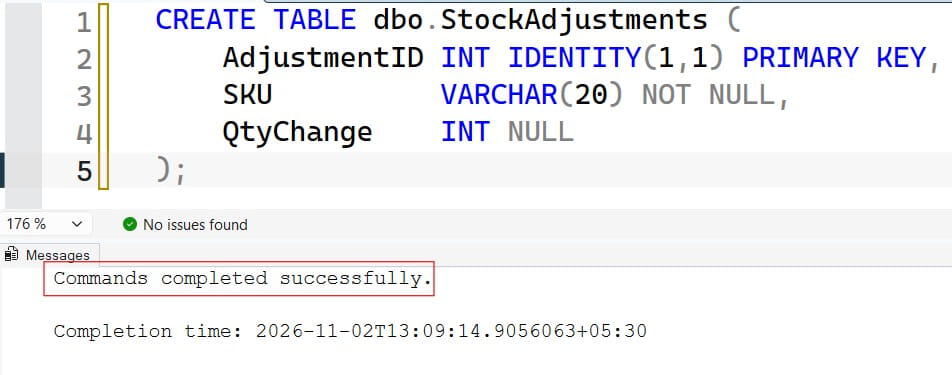
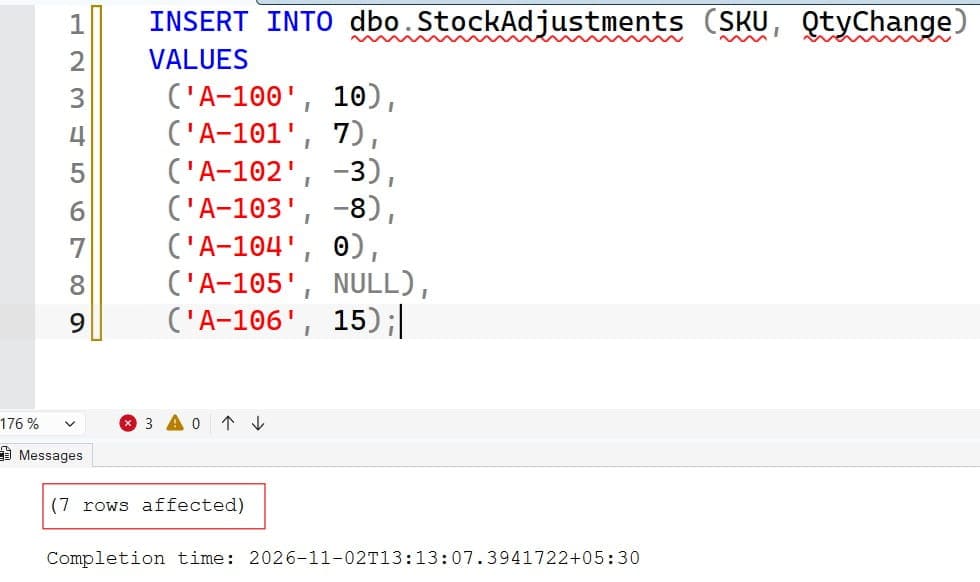
The table has positive and negative numbers, zero, and a NULL. A NULL is a missing or unknown value, not zero. Run this only in a test database, because it inserts rows.
Pro Tip: In my experience, every number-logic bug I have fixed involved a value the developer never tested: zero, a negative, or NULL. I put all three in my sample data before writing the first query.
The Modulo Method to Find Even and Odd Numbers in SQL Server
The modulo operator (%) returns the remainder after division. Any even number divided by 2 leaves a remainder of 0. Any odd number leaves a remainder of 1 or, for negatives in SQL Server, -1.
SELECT AdjustmentID, QtyChange
FROM dbo.StockAdjustments
WHERE QtyChange % 2 = 0;
After executing the above query, I got the expected output as shown in the screenshot below.
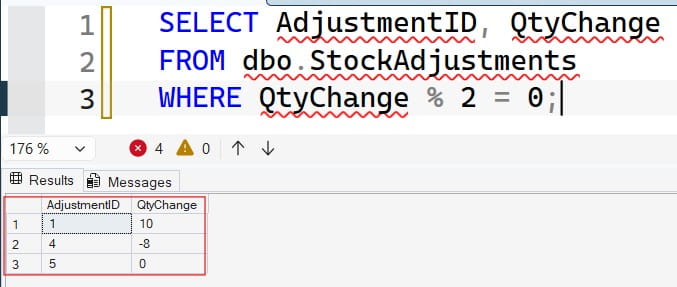
This returns 10, -8, and 0. Zero is even, which is mathematically correct. The NULL row is not returned, because NULL % 2 is NULL, and a comparison with NULL is never true. Learn more in how SQL handles NULL and the WHERE clause tutorial.
The Negative Number Trap
Now try the obvious query for odd numbers:
-- Misses negative odd numbers
SELECT AdjustmentID, QtyChange
FROM dbo.StockAdjustments
WHERE QtyChange % 2 = 1;
After executing the above query, I got the expected output as shown in the screenshot below.
After executing the above query, I got the expected output as shown in the screenshot below.
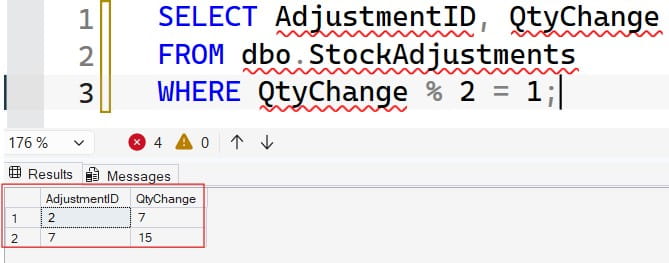
This returns 7 and 15 but not -3. In SQL Server, the result of % takes the sign of the dividend, so -3 % 2 equals -1, not 1. The fix is to test for “not even” instead:
SELECT AdjustmentID, QtyChange
FROM dbo.StockAdjustments
WHERE QtyChange % 2 <> 0;
After executing the above query, I got the expected output as shown in the screenshot below.
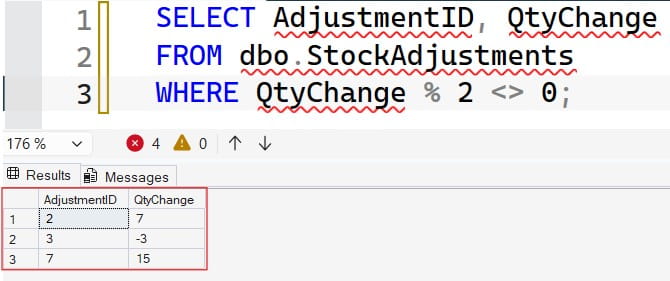
Now the result is 7, -3, and 15. Using <> 0 works for positive and negative numbers. Alternatively, wrap the result in ABS(), which returns the absolute value, as in ABS(QtyChange % 2) = 1.
Pro Tip: I never write
% 2 = 1anymore. I use% 2 <> 0for odd numbers, so negative values are handled without thinking about it.
Use CASE to Label Each Row
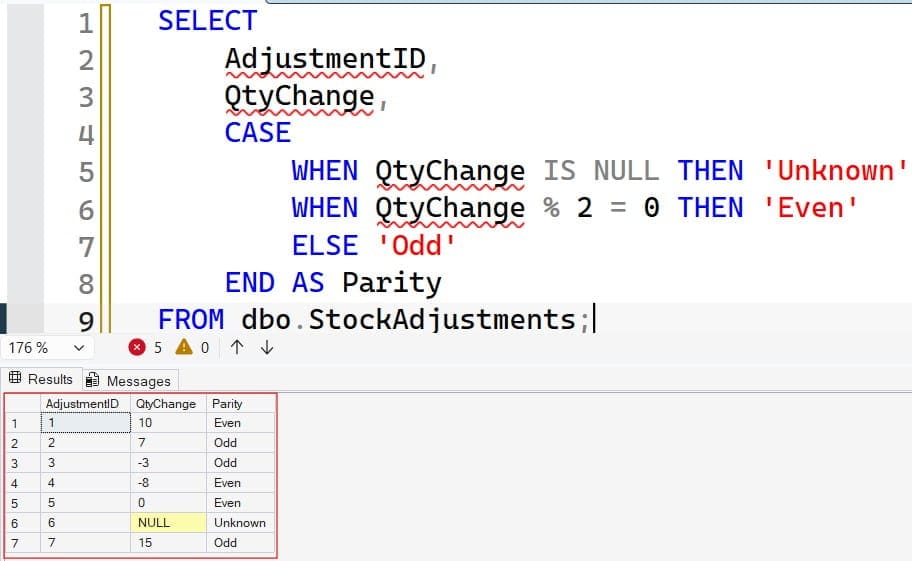
Often you need a label, not a filter. CASE evaluates conditions in order and returns the first match; see the CASE statement in SQL Server.
SELECT
    AdjustmentID,
    QtyChange,
    CASE
        WHEN QtyChange IS NULL THEN 'Unknown'
        WHEN QtyChange % 2 = 0 THEN 'Even'
        ELSE 'Odd'
    END AS Parity
FROM dbo.StockAdjustments;
The NULL check comes first so the row is labeled Unknown instead of falling into ELSE and being called odd. That mistake is common: any NULL that fails the even test would land in the odd bucket.
For a simple two-way choice, IIF is shorter; see the IIF function.
SELECT AdjustmentID,
       IIF(QtyChange % 2 = 0, 'Even', 'Odd') AS Parity
FROM dbo.StockAdjustments
WHERE QtyChange IS NOT NULL;
IIF is shorthand for a two-branch CASE. It cannot express an “Unknown” third case on its own, so filter NULLs out first, as above.
The Bitwise Method
A bitwise AND (&) compares the binary bits of two numbers. In binary, an odd number always has its last bit set to 1. So value & 1 returns 1 for odd numbers and 0 for even ones, including negatives, which SQL Server stores in two’s complement form.
SELECT AdjustmentID, QtyChange,
       QtyChange & 1 AS IsOdd
FROM dbo.StockAdjustments
WHERE QtyChange IS NOT NULL;
For -3, the result is 1, so the negative number is correctly seen as odd. This avoids the sign problem of %. The limits are that & works only on integer types, not DECIMAL, and many readers find % 2 clearer. I use bitwise checks in code where the data is always integer and I want one result for any sign, and % 2 <> 0 everywhere else.
| Method | Handles negatives | Works on decimals | Readability |
|---|---|---|---|
% 2 = 0 (even test) | Yes | Only for whole values | High |
% 2 = 1 (odd test) | No | No | High, but buggy |
% 2 <> 0 (odd test) | Yes | Whole values | High |
& 1 | Yes | No (integers only) | Medium |
Pro Tip: I keep the bitwise form out of shared code unless I add a comment. A teammate who does not recognize
& 1may “fix” it later, so I write-- 1 = oddbeside it.
Decimals, Text Columns, and Data Types
The modulo operator accepts integer, money, and numeric types. It rejects FLOAT and REAL, and it does not make sense for fractions: 7.5 % 2 returns 1.5, which is neither 0 nor 1. If a column stores decimals, decide what “even” means first. Many teams round or cast to an integer, or reject non-whole values.
SELECT 7.5 % 2 AS DecimalRemainder,   -- 1.5
       CAST(8.0 AS INT) % 2 AS WholeValue;  -- 0
If the number is stored as text, convert it before testing. A data type tells SQL Server what kind of value a column holds. Use TRY_CONVERT, which returns NULL instead of an error when conversion fails; see TRY_CONVERT and the CAST function.
sqlSELECT Value,
       CASE
           WHEN TRY_CONVERT(INT, Value) IS NULL THEN 'Not a whole number'
           WHEN TRY_CONVERT(INT, Value) % 2 = 0 THEN 'Even'
           ELSE 'Odd'
       END AS Parity
FROM (VALUES ('12'), ('7'), ('abc'), ('3.5')) AS v(Value);
Without TRY_CONVERT, the text 'abc' would raise a conversion error; see the varchar to numeric conversion error. Storing numbers in text columns causes these problems repeatedly, so fix the data type if you control the schema.
Pro Tip: In my experience, “even or odd” bugs on imported data are usually text-cleanup bugs. Check with
TRY_CONVERTfirst and fix the bad rows before the logic runs.
Count and Sum Even and Odd Values
Reports often need totals by parity. Combine GROUP BY with the parity test; see how COUNT works and the SUM function.
SELECT
    CASE WHEN QtyChange % 2 = 0 THEN 'Even' ELSE 'Odd' END AS Parity,
    COUNT(*)        AS Rows_,
    SUM(QtyChange)  AS TotalQty
FROM dbo.StockAdjustments
WHERE QtyChange IS NOT NULL
GROUP BY CASE WHEN QtyChange % 2 = 0 THEN 'Even' ELSE 'Odd' END;
With the sample data, even rows are 10, -8, and 0, with 3 rows and a total of 2. Odd rows are 7, -3, and 15, also 3 rows with a total of 19. The CASE expression appears in both SELECT and GROUP BY, because SQL Server needs the same expression in each.
Generate a List of Even and Odd Numbers
To produce a range of numbers, use GENERATE_SERIES, available in SQL Server 2022 and Azure SQL Database. It returns a sequence of numbers.
SELECT value AS EvenNumber
FROM GENERATE_SERIES(1, 20)
WHERE value % 2 = 0;
This returns 2, 4, 6, up to 20. Its second argument is the stop value, and an optional third argument sets the step. You can skip filtering by stepping directly: GENERATE_SERIES(2, 20, 2) returns only the even numbers, which is more efficient.
On older versions, use a recursive CTE (common table expression), a named temporary result you can query right away.
WITH Numbers AS (
    SELECT 1 AS n
    UNION ALL
    SELECT n + 1 FROM Numbers WHERE n < 20
)
SELECT n AS OddNumber
FROM Numbers
WHERE n % 2 <> 0
OPTION (MAXRECURSION 100);
MAXRECURSION sets a safety limit on how many times the CTE can call itself. The default is 100. Raise it deliberately for larger ranges, because it protects you from runaway loops. For more row-by-row logic, a loop is possible but slower; see WHILE loops in stored procedures. In my experience, set-based code like GENERATE_SERIES beats loops almost every time.
Frequently Asked Questions
How do I check if a number is even or odd in SQL Server?
Use the modulo operator. value % 2 = 0 means even, and value % 2 <> 0 means odd. The <> 0 form also works for negative numbers.
Why does % 2 = 1 miss some odd numbers?
In SQL Server, the sign of the result matches the sign of the dividend, so -3 % 2 returns -1. Test for <> 0 or use ABS(value % 2) = 1.
Is zero even or odd in SQL?
Zero is even, because 0 % 2 returns 0. Your query will classify it as even.
How do I get only even rows from a table?
If you mean rows at even positions, number them with ROW_NUMBER() and filter rn % 2 = 0. If you mean even ID values, filter ID % 2 = 0, but remember that gaps in an identity column make this different from alternating rows.
Can I use an index to speed up even and odd filters?
Not directly, because value % 2 is not sargable. A persisted computed column can be indexed, but a two-value column has low selectivity, so test the execution plan before adding it.
You learned how to find even and odd numbers in SQL Server with modulo, bitwise AND, CASE, GENERATE_SERIES, and ROW_NUMBER, and how to handle negatives, NULLs, and text values. Test your logic against zero, negative, and NULL values, and give report users read-only access through an Entra identity. I hope you found this article helpful.
You May Also Like
- How to Use CASE WHEN in SQL Server
- How to Generate Sequence Number in SQL Server (4 Ways)
- How to use the AVG function in SQL Server
- How to use the MAX function in SQL Server
- How to use the MIN function in SQL Server
- Top 10 SQL Server commands you must know
- SQL cheat sheet

After working for more than 15 years in the Software field, especially in Microsoft technologies, I have decided to share my expert knowledge of SQL Server. Check out all the SQL Server and related database tutorials I have shared here. Most of the readers are from countries like the United States of America, the United Kingdom, New Zealand, Australia, Canada, etc. I am also a Microsoft MVP. Check out more here.