
In this tutorial, I will guide you through the complete technical mechanics of MIN() and MAX(). We will explore basic aggregations, categorical grouping, subquery filtering, window function implementations, and query optimizer indexing strategies across major enterprise database engines.
SQL MIN MAX
What Are the SQL MIN() and MAX() Functions?
The MIN() and MAX() functions are ANSI SQL-compliant aggregate functions designed to evaluate a set of values in a specific column or expression and return a single scalar output:
MIN(expression): Returns the minimum (lowest) value in a set.MAX(expression): Returns the maximum (highest) value in a set.
Both functions are universal across all relational database management systems (RDBMS), including Microsoft SQL Server, PostgreSQL, MySQL, Oracle Database, Snowflake, and Google BigQuery.
Because they are aggregate functions, they summarize multi-row inputs into a single row unless paired with an analytical OVER() clause or grouped across dimensional attributes using GROUP BY.
Syntax and Core Mechanics
The syntax for both functions is straightforward:
SQL
SELECT
    MIN(column_name) AS lowest_value,
    MAX(column_name) AS highest_value
FROM table_name
WHERE filter_conditions;
Basic Aggregate Query
Consider a table named Corporate.EmployeeCompensation containing employee payroll data:
SQL
SELECT
    MIN(BaseSalary) AS MinimumSalary,
    MAX(BaseSalary) AS MaximumSalary,
    MAX(BaseSalary) - MIN(BaseSalary) AS SalarySpread
FROM Corporate.EmployeeCompensation
WHERE EmploymentStatus = 'Active';
Result: After executing the above query, I got the expected output as shown in the screenshot below.
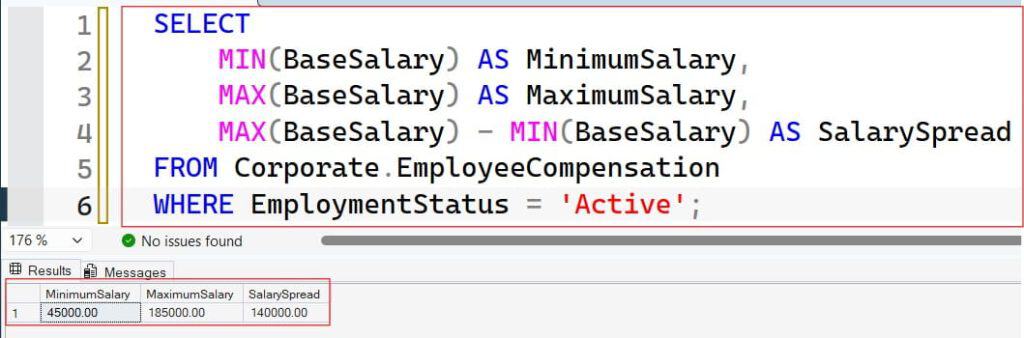
In this single pass, the database engine scans the filtered rowset, discards non-matching rows, ignores any unpopulated records, and computes both boundary points alongside the calculated dynamic range (SalarySpread).
How MIN() and MAX() Operate on Different Data Types
A common misconception among early-career developers is that MIN() and MAX() are strictly arithmetic tools. In standard relational database architecture, these functions operate across all sortable data types, including numeric, date/time, and character string columns.
1. Numeric Data Types (INT, BIGINT, DECIMAL, FLOAT)
With numeric types, the functions perform standard mathematical comparisons, accounting for positive and negative values:
SQL
SELECT
    MIN(AccountBalance) AS DeepestOverdraft,
    MAX(AccountBalance) AS PeakLiquidity
FROM Finance.CommercialAccounts;
2. Date and Time Data Types (DATE, DATETIME2, TIMESTAMP)
When applied to temporal fields, MIN() and MAX() identify chronologically extreme timestamps:
MIN(date_column): Identifies the earliest or oldest timestamp (furthest in the past).MAX(date_column): Identifies the latest or most recent timestamp (closest to current time or furthest into the future).
SQL
SELECT
    MIN(CreationTimestamp) AS FirstSystemUserCreated,
    MAX(LastLoginTimestamp) AS MostRecentActivity
FROM Security.UserAuditLog;
3. Character and String Data Types (VARCHAR, CHAR, TEXT)
When applied to text, MIN() and MAX() evaluate values based on the database’s configured collation and character set encoding (e.g., ASCII, UTF-8, or Latin1):
MIN(string_column): Returns the string that appears first in alphabetical/lexicographical order.MAX(string_column): Returns the string that appears last in alphabetical/lexicographical order.
SQL
SELECT
    MIN(LastName) AS AlphabeticallyFirst,
    MAX(LastName) AS AlphabeticallyLast
FROM HumanResources.StaffDirectory;
Data Type Behavior Reference Table
| Data Type Category | MIN() Evaluates To | MAX() Evaluates To | Example Scenario |
|---|---|---|---|
| Numeric | Lowest numeric value | Highest numeric value | Minimum profit margin, peak sensor temperature |
| Temporal | Earliest chronologic date | Latest chronologic date | Original hire date, most recent transaction |
| Character | First lexicographical string | Last lexicographical string | First product alphabetically, last SKU code |
| Boolean | FALSE (or 0) | TRUE (or 1) | Verifying if any flag is active |
Handling NULL Values and Three-Valued Logic
In relational databases governed by three-valued logic (True, False, Unknown), NULL represents the absence of a value.
When evaluating data sets, MIN() and MAX() strictly adhere to the ANSI SQL standard rule: aggregate functions automatically eliminate NULL values from the calculation.
SQL
-- Sample values in BonusTier column: [ 1000.00, NULL, 5000.00, NULL, 2500.00 ]
SELECT
    MIN(BonusTier) AS MinBonus,
    MAX(BonusTier) AS MaxBonus
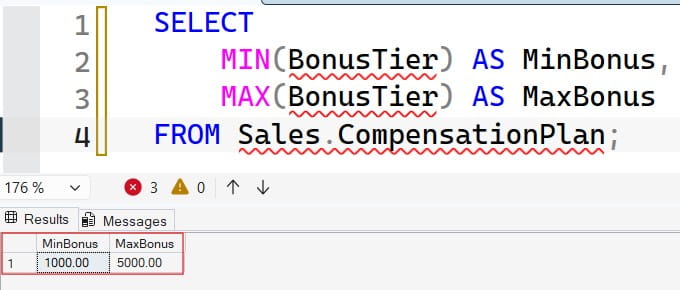
FROM Sales.CompensationPlan;MIN(BonusTier)evaluates only[1000.00, 5000.00, 2500.00], yielding1000.00.MAX(BonusTier)evaluates the same subset, yielding5000.00.- The
NULLvalues are excluded without raising a runtime warning or converting into zeros.
After executing the above query, I got the expected output as shown in the screenshot below.
The All-NULL Edge Case
If a column contains only NULL records, or if the WHERE clause filters out every row in the table, both MIN() and MAX() return NULL.
SQL
-- When no rows match criteria:
SELECT
    MIN(AnnualBonus) AS LowestBonus,
    MAX(AnnualBonus) AS HighestBonus
FROM Sales.CompensationPlan
WHERE DepartmentID = 99999; -- Non-existent department
Result:
Plaintext
LowestBonus | HighestBonus
------------+-------------
NULL        | NULL
Production Tip: If your downstream application tier or API contract cannot accept a
NULLresponse, wrap your aggregate function in aCOALESCE()orISNULL()expression to provide a deterministic fallback:SQL
SELECT COALESCE(MAX(AnnualBonus), 0.00) AS SafeMaxBonus
FROM Sales.CompensationPlan;
Categorical Aggregation: Combining MIN and MAX with GROUP BY
In enterprise reporting, you rarely need the global extreme across an entire table. Instead, you need extreme values grouped across business dimensions—such as regions, departments, or product categories.
When combined with the GROUP BY clause, MIN() and MAX() calculate the extreme boundaries independently for each distinct group partition.
Grouped Aggregation Example
SQL
SELECT
    DepartmentName,
    StateLocation,
    COUNT(EmployeeID) AS TotalHeadcount,
    MIN(BaseSalary) AS DepartmentFloorSalary,
    MAX(BaseSalary) AS DepartmentCeilingSalary,
    MAX(HireDate) AS NewestTeamMemberHireDate
FROM Enterprise.PersonnelDirectory
GROUP BY
    DepartmentName,
    StateLocation
ORDER BY
    DepartmentName ASC,
    StateLocation ASC;
In this query, SQL Server partitions the records by unique combinations of DepartmentName and StateLocation, computing the discrete salary bounds and the latest hire date for each individual subset.
Filtering Aggregated Results Using the HAVING Clause
A frequent mistake in SQL development is confusing row-level filters (WHERE) with aggregate-level filters (HAVING).
WHERE: Filters raw records before aggregations are calculated.HAVING: Filters aggregated result groups after theMIN()orMAX()evaluations have been computed.
SQL
-- INCORRECT: Aggregates are not allowed in the WHERE clause
-- SELECT DepartmentID, MAX(BaseSalary) FROM Payroll WHERE MAX(BaseSalary) > 100000 GROUP BY DepartmentID;

-- CORRECT: Using HAVING to filter aggregate boundaries
SELECT
    DepartmentID,
    MIN(BaseSalary) AS LowestPay,
    MAX(BaseSalary) AS HighestPay
FROM Enterprise.Payroll
GROUP BY DepartmentID
HAVING MAX(BaseSalary) >= 125000.00
   AND MIN(BaseSalary) >= 50000.00;
The database engine first reads the table, calculates the minimum and maximum salaries per DepartmentID, and then discards any department where the highest salary is under $125,000 or the lowest salary is below $50,000.
Advanced Analytical Patterns: MIN() and MAX() as Window Functions
When invoked with an OVER() clause, MIN() and MAX() transform from standard aggregate functions into analytical window functions. Instead of collapsing multiple rows into one, they compute dynamic boundaries while preserving individual row identities.
1. Partition-Wide Boundaries Without Collapsing Rows
You can display an employee’s salary right next to their department’s maximum and minimum salary for immediate comparative analysis:
SQL
SELECT
    EmployeeID,
    DepartmentID,
    LastName,
    BaseSalary,
    MIN(BaseSalary) OVER (PARTITION BY DepartmentID) AS DepartmentFloor,
    MAX(BaseSalary) OVER (PARTITION BY DepartmentID) AS DepartmentCeiling,
    BaseSalary - MIN(BaseSalary) OVER (PARTITION BY DepartmentID) AS DistanceFromFloor
FROM Enterprise.Payroll;
2. Cumulative / Running Extremes Over Time
By adding an ORDER BY clause inside the OVER() declaration, you can calculate a running minimum or running maximum across chronological records:
SQL
SELECT
    TransactionDate,
    DailyRevenue,
    -- Tracks the highest single-day revenue achieved up to the current row
    MAX(DailyRevenue) OVER (
        ORDER BY TransactionDate
        ROWS BETWEEN UNBOUNDED PRECEDING AND CURRENT ROW
    ) AS AllTimePeakRevenueToDate
FROM Sales.DailyFinancialLedger;
Frequently Asked Questions (FAQs)
Can I use DISTINCT inside MIN() or MAX()?
Yes, syntax like MIN(DISTINCT Column) is valid SQL. However, using DISTINCT inside MIN() or MAX() is computationally redundant. The minimum or maximum of a unique set of numbers is identical to the minimum or maximum of a duplicate set (e.g., MIN([5, 5, 10]) = 5 and MIN([5, 10]) = 5). Omitting DISTINCT avoids unnecessary sorting overhead.
Is SELECT MAX(ID) + 1 a safe way to generate primary keys?
No. This is a dangerous database anti-pattern. In multi-user concurrent systems, two transactions executing MAX(ID) + 1 simultaneously will read the same maximum number and attempt to insert identical keys, causing primary key collision errors or race conditions. Always use native database sequencing mechanisms like IDENTITY (SQL Server), AUTO_INCREMENT (MySQL), SERIAL/GENERATED ALWAYS AS IDENTITY (PostgreSQL), or SEQUENCE objects.
Can MIN() and MAX() evaluate multiple columns simultaneously?
Standard aggregate MIN() and MAX() operate vertically on a single column across multiple rows. If you need to evaluate the minimum or maximum value horizontally across multiple columns in a single row, use the ANSI standard LEAST() and GREATEST() scalar functions:
SQL
SELECT
    ProductID,
    WarehouseA_Stock,
    WarehouseB_Stock,
    LEAST(WarehouseA_Stock, WarehouseB_Stock) AS LowestLocalInventory,
    GREATEST(WarehouseA_Stock, WarehouseB_Stock) AS HighestLocalInventory
FROM Inventory.StockLevels;
Summary and Key Takeaways
The SQL MIN() and MAX() functions are essential tools for extracting boundary insights from relational datasets:
- Universal ANSI Support: Compatible across all modern relational engines and cloud data warehouses.
- Broad Data Type Capability: Evaluates numbers mathematically, dates chronologically, and text strings lexicographically based on database collation.
- Automatic NULL Handling: Discards
NULLvalues automatically without corrupting mathematical or statistical evaluations. - Full-Row Retrieval: Use Window Functions (
DENSE_RANK() OVER (...) = 1) inside a CTE to retrieve complete records matching extreme boundaries cleanly.
You may also like the following articles:
- How to Execute Function in SQL Server with Parameters
- SQL Server FLOOR
- COALESCE SQL
- SQL COUNT DISTINCT
- SQL Scalar Functions

After working for more than 15 years in the Software field, especially in Microsoft technologies, I have decided to share my expert knowledge of SQL Server. Check out all the SQL Server and related database tutorials I have shared here. Most of the readers are from countries like the United States of America, the United Kingdom, New Zealand, Australia, Canada, etc. I am also a Microsoft MVP. Check out more here.