
Understanding row_number vs rank vs dense_rank in SQL is one of the highest-value skills for anyone writing T-SQL reports. These three window functions look nearly identical, yet they produce different results the moment two rows share a value. Picking the wrong one causes duplicate invoice numbers, missing rows, and reports that change between runs.
This guide shows what each function returns on the same data, when to use each, and how to index and secure the queries in SQL Server and Azure SQL Database. You will also learn the errors that trip people up the most.
Quick Answer: How the Three Functions Differ
All three are window functions. A window function calculates a value across a set of related rows without collapsing them into one row, the way GROUP BY does. Our overview of window functions in SQL Server covers the full family.
Here is the whole difference in one table:
| Function | Ties get the same number? | Gaps after ties? | Typical use |
|---|---|---|---|
ROW_NUMBER() | No, always unique | No | Deduplication, pagination, “pick one row” |
RANK() | Yes | Yes (1, 1, 3) | Competition-style rankings |
DENSE_RANK() | Yes | No (1, 1, 2) | “Top N distinct values” |
A tie means two rows have the same value in the ORDER BY of the window. If your data can never tie, all three return identical numbers. Real data almost always ties, so the difference matters.
Pro Tip: In my experience, I decide the tie rule before I pick the function. If the business cannot say what should happen when two rows tie, the report is not ready to build.
Set Up Sample Data With Deliberate Ties
Use a development database for this. A schema is a named container for database objects, and dbo is the default. The table below uses a decimal type for money, because floating-point types can produce rounding differences that break tie comparisons.
It also has a primary key, a column that uniquely identifies each row, which becomes the tie-breaker later. See how to create a table with a primary key in SQL Server if you want more detail.
CREATE TABLE dbo.CustomerOrders
(
    OrderId     int IDENTITY(1,1) NOT NULL
        CONSTRAINT PK_CustomerOrders PRIMARY KEY,
    CustomerId  varchar(10)   NOT NULL,
    OrderDate   date          NOT NULL,
    OrderTotal  decimal(10,2) NOT NULL
);

INSERT INTO dbo.CustomerOrders (CustomerId, OrderDate, OrderTotal)
VALUES
 ('C101', '2026-01-05', 500.00),
 ('C102', '2026-01-06', 500.00),
 ('C101', '2026-01-09', 450.00),
 ('C103', '2026-01-10', 300.00),
 ('C102', '2026-01-12', 300.00),
 ('C104', '2026-01-15', 300.00),
 ('C103', '2026-01-18', 200.00);
After running the query above, I got the expected output shown in the screenshot below.
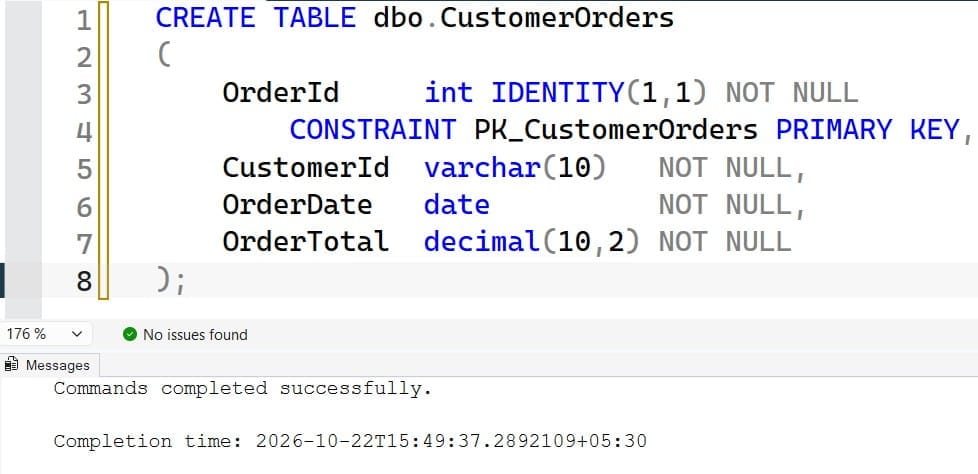
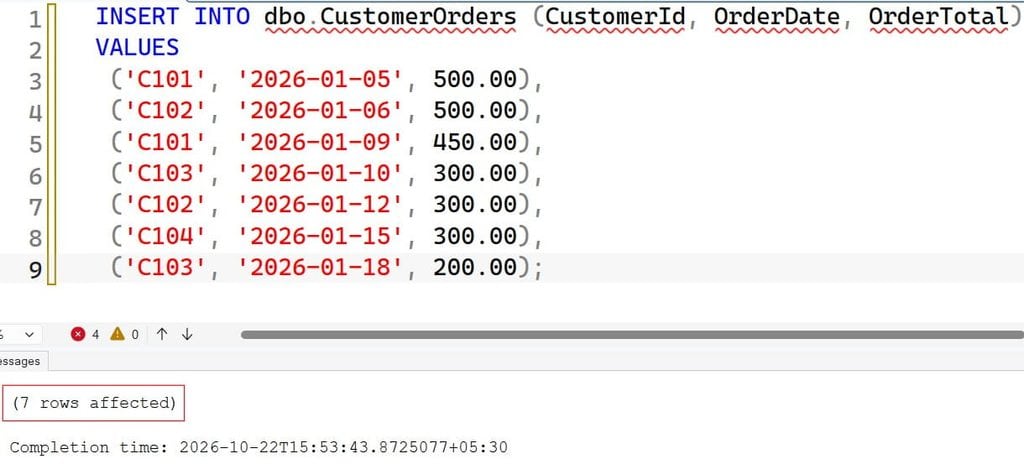
The first statement creates the table, and the IDENTITY(1,1) property numbers orders automatically. The INSERT loads seven rows with two ties on 500 and three ties on 300. Run the insert only once, because running it again duplicates the rows and changes every result below.
Pro Tip: I always seed test data with at least one three-way tie. Two-way ties hide bugs that three-way ties expose.
See All Three Functions Side by Side
Run the three functions in one query so you can compare them directly.
SELECT OrderId,
       CustomerId,
       OrderTotal,
       ROW_NUMBER() OVER (ORDER BY OrderTotal DESC, OrderId) AS RowNum,
       RANK()       OVER (ORDER BY OrderTotal DESC)          AS RankNum,
       DENSE_RANK() OVER (ORDER BY OrderTotal DESC)          AS DenseRankNum
FROM dbo.CustomerOrders
ORDER BY OrderTotal DESC, OrderId;
After running the query above, I got the expected output shown in the screenshot below.
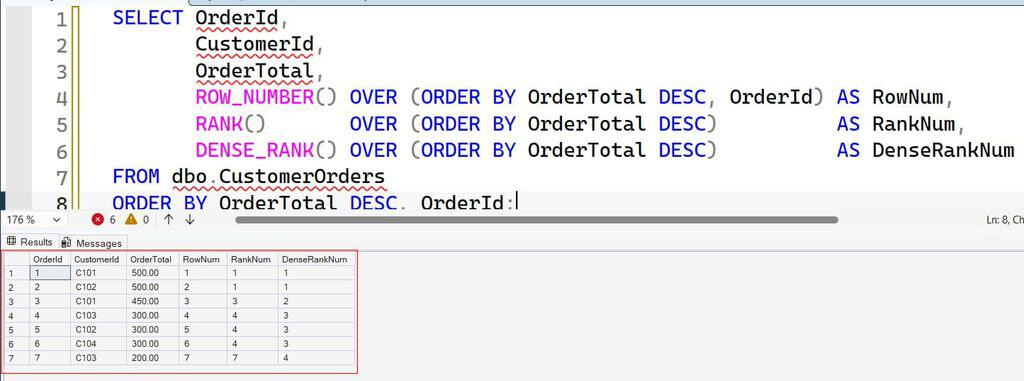
The OVER clause defines the window. ORDER BY OrderTotal DESC ranks the largest totals first. For ROW_NUMBER, I added OrderId as a tie-breaker, a second sort column that makes the result repeatable. Our guide to the OVER clause explains each part.
The output looks like this:
| OrderId | OrderTotal | RowNum | RankNum | DenseRankNum |
|---|---|---|---|---|
| 1 | 500.00 | 1 | 1 | 1 |
| 2 | 500.00 | 2 | 1 | 1 |
| 3 | 450.00 | 3 | 3 | 2 |
| 4 | 300.00 | 4 | 4 | 3 |
| 5 | 300.00 | 5 | 4 | 3 |
| 6 | 300.00 | 6 | 4 | 3 |
| 7 | 200.00 | 7 | 7 | 4 |
Read it column by column. ROW_NUMBER runs 1 to 7 and never repeats. RANK gives both 500s a rank of 1, then jumps to 3, because two rows already occupy ranks 1 and 2. After the three-way tie at rank 4, it jumps to 7. DENSE_RANK gives both 500s a 1 and continues with 2, then 3, then 4, with no gaps.
Without the OrderId tie-breaker, SQL Server may number tied rows in any order, and that order can change between runs or after an index change. That is the most common source of “the report changed and nobody touched it.”
Pro Tip: I once traced a duplicate-invoice incident to a
ROW_NUMBERwith no tie-breaker. After a nightly index rebuild, the “first” row for a tie flipped, and a customer was billed twice.
ROW_NUMBER: Deduplication and Pagination
Use ROW_NUMBER when you need exactly one row per group, or a stable sequence number. See the ROW_NUMBER function guide for syntax details.
Keep the Latest Row per Customer
Suppose a staging table receives customer records from a nightly import, and the same email arrives several times.
WITH Ranked AS
(
    SELECT StagingId, Email, FullName, LoadedAt,
           ROW_NUMBER() OVER (
               PARTITION BY Email
               ORDER BY LoadedAt DESC, StagingId DESC
           ) AS rn
    FROM dbo.CustomerStaging
)
SELECT StagingId, Email, FullName, LoadedAt
FROM Ranked
WHERE rn = 1;
PARTITION BY Email restarts the numbering for each email address. ORDER BY LoadedAt DESC puts the newest load first, so rn = 1 is the latest row. The CTE (common table expression) named Ranked is a temporary named result set that exists for this one statement. You need it because you cannot filter on a window function directly in WHERE. See CTE vs temp table in SQL Server to decide which fits your case, and read about PARTITION BY for grouping details. For a related pattern, see how to get the latest record by date.
Delete the Duplicates
To remove the older rows, change the final SELECT to a DELETE against the CTE. This permanently deletes data. Run the SELECT first, take a backup, and wrap the delete in a transaction.
BEGIN TRANSACTION;

WITH Ranked AS
(
    SELECT ROW_NUMBER() OVER (
               PARTITION BY Email
               ORDER BY LoadedAt DESC, StagingId DESC
           ) AS rn
    FROM dbo.CustomerStaging
)
DELETE FROM Ranked
WHERE rn > 1;

SELECT @@ROWCOUNT AS RowsDeleted;
-- Review the count, then run COMMIT TRANSACTION; or ROLLBACK TRANSACTION;
The DELETE removes every row numbered above 1, leaving the newest per email. @@ROWCOUNT reports how many rows were deleted so you can sanity-check before committing. Read our guide on deleting duplicate records in SQL Server for more patterns, and make a table backup before any destructive cleanup.
Pro Tip: I always run the dedupe as a
SELECTfirst and compare the count with aGROUP BY Email HAVING COUNT(*) > 1check. If the numbers do not match, I stop.
RANK and DENSE_RANK: Top N Questions
These two functions answer ranking questions where ties should share a position. The difference shows up in “top N” filters. Our guide on using the RANK function in SQL Server covers the basics.
WITH Ranked AS
(
    SELECT OrderId, CustomerId, OrderTotal,
           RANK()       OVER (ORDER BY OrderTotal DESC) AS RankNum,
           DENSE_RANK() OVER (ORDER BY OrderTotal DESC) AS DenseRankNum
    FROM dbo.CustomerOrders
)
SELECT *
FROM Ranked
WHERE RankNum <= 3;
After running the query above, I got the expected output shown in the screenshot below.
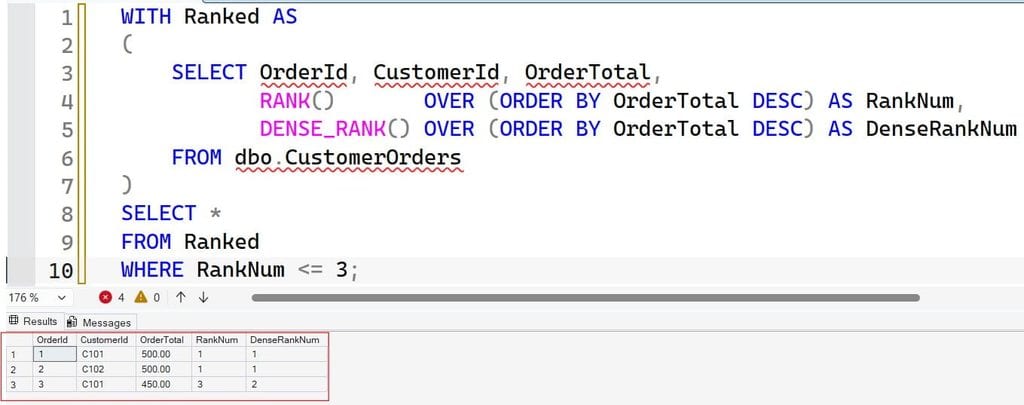
Filtering on RankNum <= 3 returns three rows: both 500s and the 450. There is no rank 2, so you see ranks 1, 1, and 3. Change the filter to DenseRankNum <= 3 and you get six rows, covering the three distinct totals of 500, 450, and 300, including all three tied 300 orders.
So which one answers your question?
- “Show me the podium.” Use
RANK. Two gold medals mean no silver, which matches sports and contest rules. - “Show me the top three price levels.” Use
DENSE_RANK. Every row at those levels is included. - “Show me exactly three rows.” Use
ROW_NUMBERwith a tie-breaker, or plainTOP (3).
Write the business rule in a comment above the query. Future you will not remember which definition you meant.
Pro Tip: In my experience, finance teams almost always want
DENSE_RANKfor “top N values,” while contest-style leaderboards wantRANK. I ask which one before I write a line of SQL.
Rank Within Groups and Handle NULLs
Most real reports rank inside a group, such as the top order per customer or the best salesperson per region. Add PARTITION BY to restart the ranking for each group.
SELECT CustomerId, OrderId, OrderTotal,
       DENSE_RANK() OVER (
           PARTITION BY CustomerId
           ORDER BY OrderTotal DESC
       ) AS CustomerRank
FROM dbo.CustomerOrders;
After running the query above, I got the expected output shown in the screenshot below.
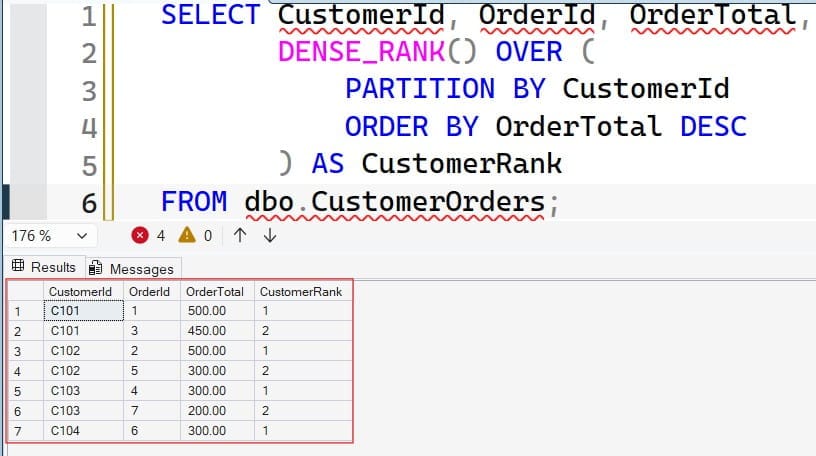
Each customer gets an independent ranking. In a multi-tenant SaaS database, the partition column should usually include the tenant ID, and so should the matching index. A missing tenant filter in a ranking query is a data leak, not just a bug.
Watch out for NULL values. SQL Server treats NULL as the lowest possible value, so NULLs sort last in a descending order and first in an ascending one. A NULL total can quietly land at rank 1 in an ascending ranking. Either exclude NULLs with a WHERE clause or handle them explicitly. Our guide to NULL values in SQL explains the behavior in depth.
Also check your data types. If the column you rank on is text, '100' sorts before '20'. Convert numeric text first, and if conversion fails you may meet error converting data type varchar to numeric.
Pro Tip: I add a
WHERE OrderTotal IS NOT NULLfilter inside the CTE and document it. Hidden NULLs have changed more rankings in my career than any other data issue.
Tune Window Function Performance
Window functions are set-based, which means SQL Server processes whole sets of rows at once instead of looping row by row. That is usually far faster than cursors. But a ranking still needs sorted data. If no index provides that order, SQL Server adds a Sort operator to the execution plan, and on millions of rows that sort can spill to disk.
Create an index that matches the PARTITION BY and ORDER BY columns:
CREATE NONCLUSTERED INDEX IX_CustomerOrders_Customer_Total
ON dbo.CustomerOrders (CustomerId, OrderTotal DESC)
INCLUDE (OrderDate);
A nonclustered index is a separate sorted structure that points back to the table rows. Putting CustomerId first matches the partition, and OrderTotal DESC matches the sort inside it. The INCLUDE column lets the index cover the query so SQL Server does not need extra lookups. With this index, the optimizer can often read rows already in order and skip the sort.
Indexes cost something. Every insert and update must maintain them, so a write-heavy table pays for each extra index. Before adding one, open the actual execution plan, find the Sort operator, and confirm it is a real bottleneck. On a seven-row table the optimizer will ignore the index, and that is fine. Learn more in our guides to creating an index in SQL Server, index best practices, and query optimization tips.
Keep statistics fresh as well. Statistics are summaries of data distribution that the optimizer uses to choose a plan. After big loads, see how to update statistics on a table. In Azure SQL Database, Query Store records plans and runtime numbers, so you can confirm an index actually reduced reads before you pay for more compute. Tuning the query usually costs less than moving to a larger service tier.
Pro Tip: I compare logical reads before and after every new index. If they do not drop meaningfully, I drop the index and keep my write speed.
Frequently Asked Questions
What is the difference between ROW_NUMBER, RANK, and DENSE_RANK?
ROW_NUMBER gives every row a unique number, even when values tie. RANK gives tied rows the same number and skips the next ones, like 1, 1, 3. DENSE_RANK gives tied rows the same number and never skips, like 1, 1, 2.
Which function should I use to remove duplicates?
Use ROW_NUMBER() with PARTITION BY on the duplicate key and an ORDER BY that decides which row to keep. Delete rows where the number is greater than 1. Test with a SELECT and a backup first.
How do I get the top N rows including ties?
Use RANK() or DENSE_RANK() and filter on the rank column. RANK <= 3 returns the podium positions, and DENSE_RANK <= 3 returns every row at the top three distinct values. TOP (3) WITH TIES is another option.
Can I use ROW_NUMBER in a WHERE clause?
Not directly. SQL Server evaluates window functions after WHERE, so you must calculate the number in a CTE or subquery and filter in the outer query.
Do window functions slow down a query?
They need sorted data, so a missing index can add an expensive Sort operator. An index on the partition and order columns often removes it. Check the actual execution plan before and after to confirm the gain.
You learned how ROW_NUMBER, RANK, and DENSE_RANK differ on tied values and which one fits deduplication, podium rankings, and top N levels. Always add a tie-breaker, test with ties in your data, and back up before any cleanup that deletes rows. I hope you found this article helpful.
You May Also Like
- SQL SELECT query examples
- SQL Server TOP clause explained
- How to use the GROUP BY clause in SQL Server
- SQL subqueries explained
- ORDER BY clause in SQL Server

After working for more than 15 years in the Software field, especially in Microsoft technologies, I have decided to share my expert knowledge of SQL Server. Check out all the SQL Server and related database tutorials I have shared here. Most of the readers are from countries like the United States of America, the United Kingdom, New Zealand, Australia, Canada, etc. I am also a Microsoft MVP. Check out more here.