
A finance manager once sent me two dashboard numbers for the same month. They were $38,000 apart, and both came from “total sales” queries. One query summed order headers, and the other joined to order lines and counted each header total once per line. Nobody had been careless. The query had simply never been checked against how the data was modeled.
That is the real challenge behind how to calculate total sales in SQL. The SUM function is easy. Choosing the right rows, avoiding duplicate counting, handling NULLs, and keeping the query fast on millions of orders is the hard part. This guide walks through a complete example with T-SQL, then covers security, performance, and Azure SQL considerations, so you can build a total sales query you can trust.
Set Up a Realistic Sales Schema
A schema here means the design of your tables and how they relate. Good totals start with good structure. Use a simple e-commerce model with orders and order lines.
CREATE TABLE dbo.Orders (
    OrderID     INT IDENTITY(1,1) PRIMARY KEY,
    CustomerID  INT NOT NULL,
    OrderDate   DATETIME2(0) NOT NULL,
    Status      VARCHAR(20) NOT NULL   -- Completed, Cancelled, Returned
);

CREATE TABLE dbo.OrderItems (
    OrderItemID INT IDENTITY(1,1) PRIMARY KEY,
    OrderID     INT NOT NULL
        REFERENCES dbo.Orders(OrderID),
    ProductID   INT NOT NULL,
    Quantity    INT NOT NULL,
    UnitPrice   DECIMAL(10,2) NOT NULL,
    Discount    DECIMAL(10,2) NULL      -- amount off the line
);
After running the query above, I got the expected output shown in the screenshot below.
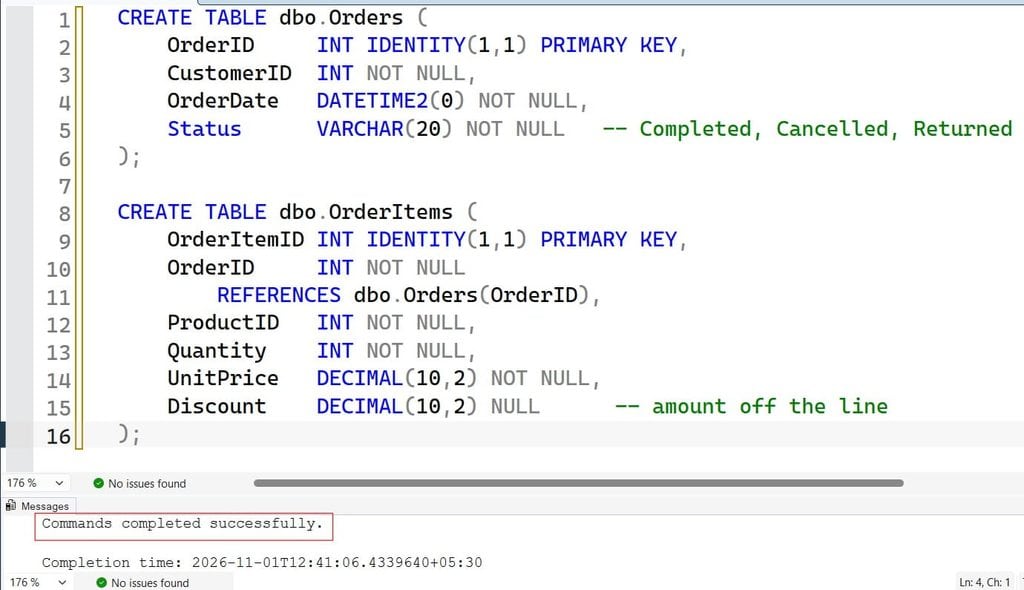
This creates two tables. Orders holds one row per order, and OrderItems holds one row per product on that order. The REFERENCES clause creates a foreign key, a rule that stops an item from pointing to an order that does not exist. If you want to review these basics, see how to create a table with a primary key and how a foreign key works in SQL Server.
I use DECIMAL(10,2) for money, not FLOAT. Floating-point types store approximate values, so totals can drift by fractions of a cent. Decimal types store exact values, which matters when finance checks your numbers.
Pro Tip: In my experience, the “sales total” bugs I see most often come from the data model, not the SQL. Before writing any query, decide which table is the source of truth for revenue. For most systems it is the line items, not a total column on the order header.
Below is the insert query:
SET XACT_ABORT ON;
BEGIN TRY
    BEGIN TRANSACTION;

    DECLARE @OrderID INT;

    -- Order 1: completed, one NULL discount
    INSERT INTO dbo.Orders (CustomerID, OrderDate, Status)
    VALUES (101, '2026-10-03 10:15:00', 'Completed');
    SET @OrderID = SCOPE_IDENTITY();

    INSERT INTO dbo.OrderItems (OrderID, ProductID, Quantity, UnitPrice, Discount)
    VALUES (@OrderID, 1, 2, 25.00, 5.00),
           (@OrderID, 2, 1, 40.00, NULL);

    -- Order 2: completed, one NULL and one zero discount
    INSERT INTO dbo.Orders (CustomerID, OrderDate, Status)
    VALUES (102, '2026-10-12 14:40:00', 'Completed');
    SET @OrderID = SCOPE_IDENTITY();

    INSERT INTO dbo.OrderItems (OrderID, ProductID, Quantity, UnitPrice, Discount)
    VALUES (@OrderID, 3, 3, 10.00, NULL),
           (@OrderID, 1, 1, 25.00, 0.00);

    -- Order 3: cancelled, should be excluded from sales
    INSERT INTO dbo.Orders (CustomerID, OrderDate, Status)
    VALUES (101, '2026-10-20 09:05:00', 'Cancelled');
    SET @OrderID = SCOPE_IDENTITY();

    INSERT INTO dbo.OrderItems (OrderID, ProductID, Quantity, UnitPrice, Discount)
    VALUES (@OrderID, 2, 2, 40.00, NULL);

    -- Order 4: completed, discount on the line
    INSERT INTO dbo.Orders (CustomerID, OrderDate, Status)
    VALUES (103, '2026-10-28 16:30:00', 'Completed');
    SET @OrderID = SCOPE_IDENTITY();

    INSERT INTO dbo.OrderItems (OrderID, ProductID, Quantity, UnitPrice, Discount)
    VALUES (@OrderID, 4, 4, 12.50, 2.50);

    COMMIT TRANSACTION;
END TRY
BEGIN CATCH
    IF @@TRANCOUNT > 0 ROLLBACK TRANSACTION;
    THROW;
END CATCH;
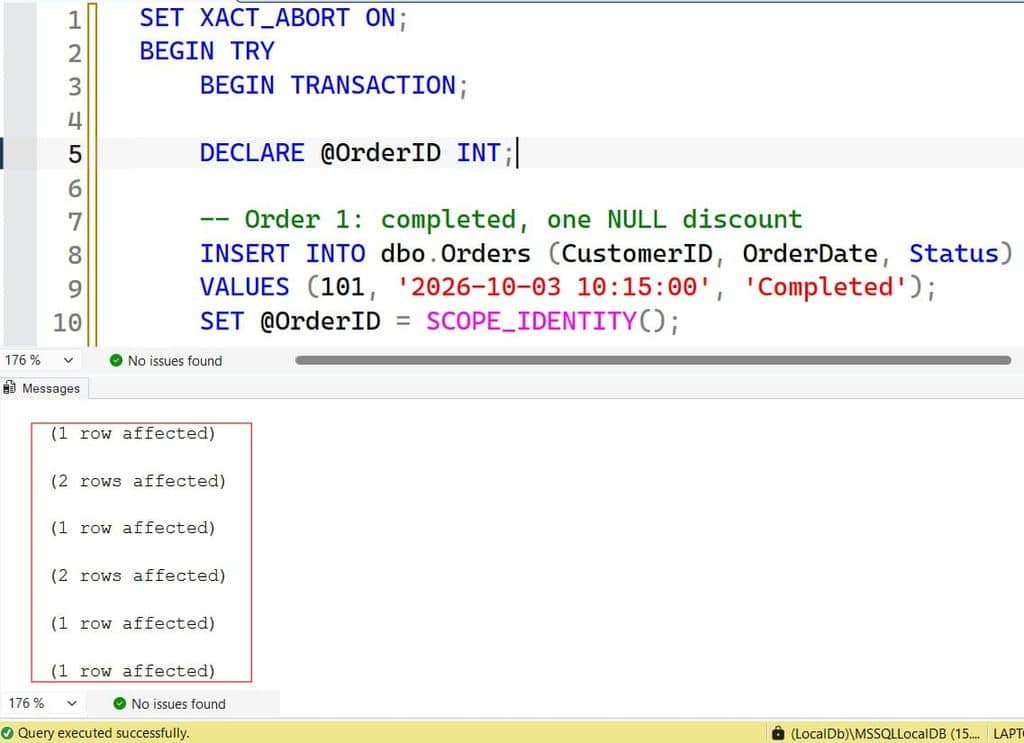
After running the query above, I got the expected output shown in the screenshot below.
The Basic Way to Calculate Total Sales in SQL
The simplest approach is to multiply quantity by price for each line and add everything up with SUM. SUM is an aggregate function, which means it collapses many rows into one value. For more on the function itself, read how to use the SUM function in SQL Server.
SELECT SUM(Quantity * UnitPrice) AS TotalSales
FROM dbo.OrderItems;
After running the query above, I got the expected output shown in the screenshot below.
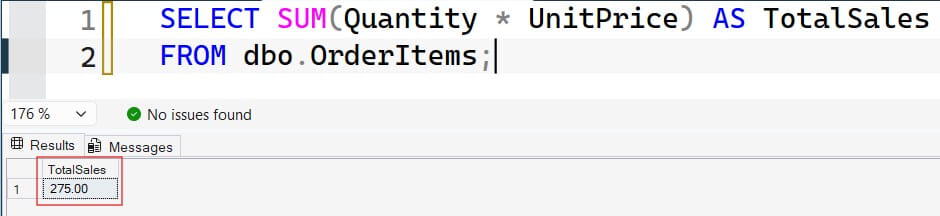
This multiplies quantity by unit price on every row, then adds the results. It is correct as a starting point, but it is rarely the number the business wants. It includes cancelled orders, ignores discounts, and covers all time.
Filter to the Right Orders
A total sales number should only include orders that count as revenue. Join to Orders and filter by status. An inner join returns only rows that match in both tables; see this inner join tutorial for more detail.
SELECT SUM(oi.Quantity * oi.UnitPrice) AS GrossSales
FROM dbo.Orders AS o
INNER JOIN dbo.OrderItems AS oi
    ON oi.OrderID = o.OrderID
WHERE o.Status = 'Completed';
After running the query above, I got the expected output shown in the screenshot below.
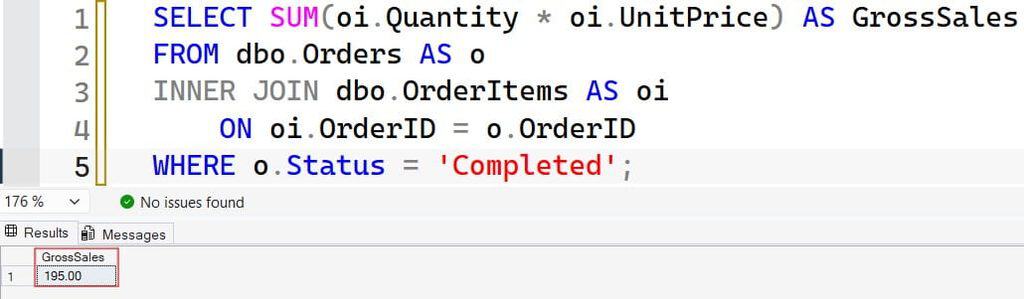
The WHERE clause removes cancelled and returned orders before the sum happens. If you are unsure when to filter in WHERE and when to use HAVING, see HAVING vs. WHERE. In short, WHERE filters rows before grouping, and HAVING filters groups after.
Pro Tip: I always run
SELECT COUNT(*)and a quick sample of rows before trusting a new total. If the row count is surprising, the join or filter is wrong, and no amount of correct arithmetic will fix it.
Handle Discounts and NULL Values
A NULL is a missing or unknown value, not zero. In SQL Server, any arithmetic with NULL returns NULL. If Discount is NULL on some rows, Quantity * UnitPrice - Discount turns into NULL for those rows, and SUM silently ignores them. Your total drops with no error.
Use COALESCE, which returns the first non-NULL value in a list. See the COALESCE function and how SQL handles NULL for more detail.
SELECT
    SUM(oi.Quantity * oi.UnitPrice) AS GrossSales,
    SUM(COALESCE(oi.Discount, 0))   AS TotalDiscounts,
    SUM(oi.Quantity * oi.UnitPrice - COALESCE(oi.Discount, 0)) AS NetSales
FROM dbo.Orders AS o
INNER JOIN dbo.OrderItems AS oi
    ON oi.OrderID = o.OrderID
WHERE o.Status = 'Completed';
After running the query above, I got the expected output shown in the screenshot below.
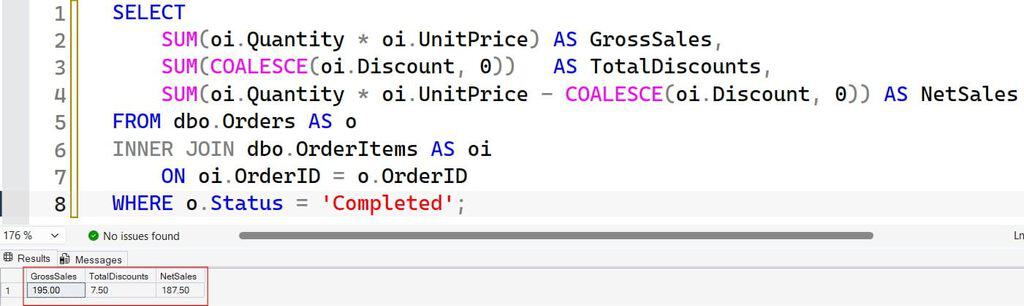
This returns three values. Gross sales is revenue before discounts. Net sales subtracts discounts. Showing both avoids arguments later, because different teams often mean different things by “total sales.”
If your result looks rounded oddly, review formatting numbers to two decimal places. If you see a conversion error when your price column is stored as text, read the varchar to numeric conversion error. The better fix is to store numbers as numeric types in the first place.
Pro Tip: I have seen a nullable discount column quietly cut a quarterly report by thousands of dollars. Where possible, make money columns
NOT NULL DEFAULT 0, so this mistake cannot happen.
Calculate Total Sales by Date Range
Most real questions are “how much did we sell this month?” Use a half-open date range, meaning start date included and end date excluded.
SELECT SUM(oi.Quantity * oi.UnitPrice - COALESCE(oi.Discount, 0)) AS NetSales
FROM dbo.Orders AS o
INNER JOIN dbo.OrderItems AS oi
    ON oi.OrderID = o.OrderID
WHERE o.Status = 'Completed'
  AND o.OrderDate >= '2026-10-01'
  AND o.OrderDate <  '2026-11-01';
After running the query above, I got the expected output shown in the screenshot below.
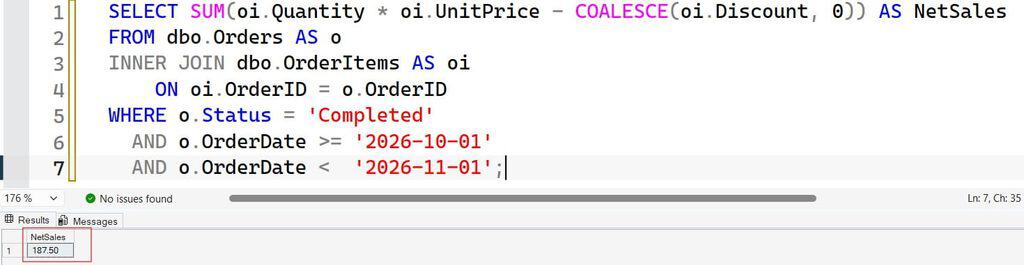
I avoid BETWEEN for datetime columns. BETWEEN '2026-10-01' AND '2026-10-31' stops at midnight on October 31 and drops almost the entire last day. The half-open pattern includes every moment of October and nothing from November. For more, see filtering by date and using BETWEEN with dates.
Also keep the date column unwrapped. Writing WHERE YEAR(o.OrderDate) = 2026 blocks index use, which forces SQL Server to scan more data. Comparing the raw column to a range lets the optimizer seek instead.
Pro Tip: In my experience, month-end reports break when someone uses
BETWEENwith a time component. Make the half-open range your team’s standard and put it in your code review checklist.
How to Calculate Total Sales in SQL by Customer and Month
Business reports rarely need one number. They need totals per customer, product, or month. The GROUP BY clause splits rows into groups, and SUM runs once per group. See how to use GROUP BY in SQL Server for the fundamentals.
SELECT
    o.CustomerID,
    DATEFROMPARTS(YEAR(o.OrderDate), MONTH(o.OrderDate), 1) AS SalesMonth,
    SUM(oi.Quantity * oi.UnitPrice - COALESCE(oi.Discount, 0)) AS NetSales
FROM dbo.Orders AS o
INNER JOIN dbo.OrderItems AS oi
    ON oi.OrderID = o.OrderID
WHERE o.Status = 'Completed'
GROUP BY
    o.CustomerID,
    DATEFROMPARTS(YEAR(o.OrderDate), MONTH(o.OrderDate), 1)
ORDER BY SalesMonth, NetSales DESC;
After running the query above, I got the expected output shown in the screenshot below.
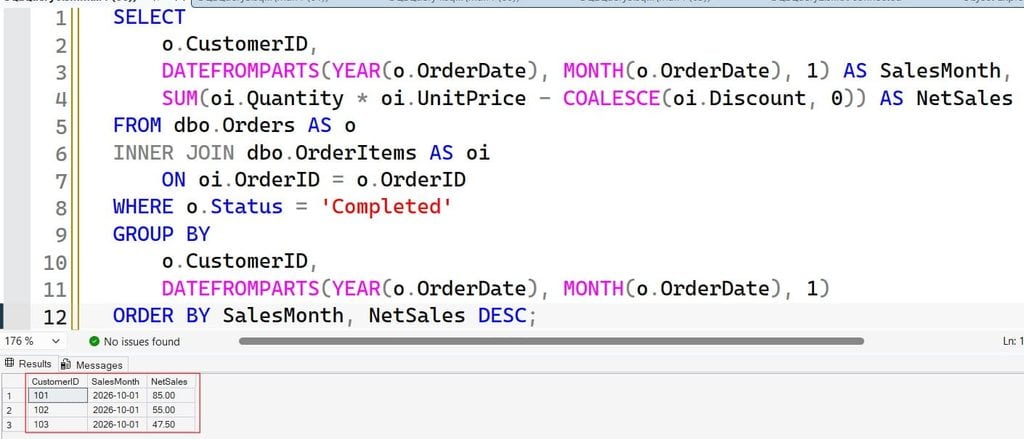
DATEFROMPARTS builds the first day of each month, which gives clean, sortable month labels. Every non-aggregated column in SELECT must appear in GROUP BY. For other grouping patterns, see grouping by date.
Avoid the Double-Counting Trap
This is the bug behind the $38,000 gap. Suppose Orders also had a OrderTotal column, and you wrote this:
-- Wrong: OrderTotal repeats once per line item
SELECT SUM(o.OrderTotal)
FROM dbo.Orders AS o
INNER JOIN dbo.OrderItems AS oi ON oi.OrderID = o.OrderID;
An order with five lines would add its header total five times. This is called fan-out, where a join multiplies rows from the “one” side. Sum values from the same grain, meaning the same level of detail. Either sum the order lines, or sum the header without joining to the lines.
If you ever need the number of orders, count distinct IDs rather than rows; see COUNT DISTINCT.
Pro Tip: I check every sales query by reconciling it against a simple independent total, such as a payment system export for one day. If the numbers differ, I look for fan-out first.
Add Running Totals and Rollups
Sometimes you need a cumulative total over time. Window functions perform calculations across related rows without collapsing them. The OVER clause defines the window; read more in window functions in SQL Server and the OVER clause.
WITH MonthlySales AS (
    SELECT
        DATEFROMPARTS(YEAR(o.OrderDate), MONTH(o.OrderDate), 1) AS SalesMonth,
        SUM(oi.Quantity * oi.UnitPrice - COALESCE(oi.Discount, 0)) AS NetSales
    FROM dbo.Orders AS o
    INNER JOIN dbo.OrderItems AS oi ON oi.OrderID = o.OrderID
    WHERE o.Status = 'Completed'
    GROUP BY DATEFROMPARTS(YEAR(o.OrderDate), MONTH(o.OrderDate), 1)
)
SELECT
    SalesMonth,
    NetSales,
    SUM(NetSales) OVER (ORDER BY SalesMonth
                        ROWS UNBOUNDED PRECEDING) AS RunningTotal
FROM MonthlySales
ORDER BY SalesMonth;
The CTE (common table expression) named MonthlySales is a temporary named result you can query right after it. The outer query then adds a running total across months. Specifying ROWS UNBOUNDED PRECEDING makes the frame explicit, and it is usually faster than the default frame.
For a grand total row on the same report, add GROUP BY ROLLUP:
SELECT
    o.CustomerID,
    SUM(oi.Quantity * oi.UnitPrice - COALESCE(oi.Discount, 0)) AS NetSales
FROM dbo.Orders AS o
INNER JOIN dbo.OrderItems AS oi ON oi.OrderID = o.OrderID
WHERE o.Status = 'Completed'
GROUP BY ROLLUP (o.CustomerID);
ROLLUP adds a final row where CustomerID is NULL and the value is the overall total. That NULL is the subtotal marker, so label it in your application.
Pro Tip: I use a CTE like this to keep the “calculate” step separate from the “present” step. It makes the query easier to test and easier for the next person to read.
Make the Calculation Reusable and Fast
Once the logic is right, package it. A view is a saved query you can select from like a table. Read about SQL Server views. A stored procedure is a saved, parameterized block of T-SQL; see how to create a stored procedure.
CREATE OR ALTER PROCEDURE dbo.usp_GetNetSales
    @StartDate DATE,
    @EndDate   DATE   -- exclusive
AS
BEGIN
    SET NOCOUNT ON;

    SELECT SUM(oi.Quantity * oi.UnitPrice - COALESCE(oi.Discount, 0)) AS NetSales
    FROM dbo.Orders AS o
    INNER JOIN dbo.OrderItems AS oi ON oi.OrderID = o.OrderID
    WHERE o.Status = 'Completed'
      AND o.OrderDate >= @StartDate
      AND o.OrderDate <  @EndDate;
END;
The procedure takes parameters, so the logic lives in one place. That prevents ten reports from computing “sales” ten different ways. SET NOCOUNT ON stops SQL Server from sending row-count messages, which reduces chatter.
Index for the Query
An index is a sorted structure that helps SQL Server find rows without scanning the whole table. For this workload, a nonclustered index on order date and status helps, and an index on OrderItems(OrderID) supports the join. Learn the basics in how to create an index in SQL Server.
CREATE NONCLUSTERED INDEX IX_Orders_Date_Status
ON dbo.Orders (OrderDate, Status)
INCLUDE (CustomerID);

CREATE NONCLUSTERED INDEX IX_OrderItems_OrderID
ON dbo.OrderItems (OrderID)
INCLUDE (Quantity, UnitPrice, Discount);
INCLUDE adds columns to the index leaf level so the query can be answered from the index alone. The trade-off is that every index slows inserts and updates and uses storage. Create them after checking the actual execution plan, not before. More tips are in SQL query optimization tips.
For heavy analytics on very large tables, a columnstore index stores data by column and compresses well, which can speed up large aggregations. Test it against your workload, since it suits reporting better than frequent single-row updates.
Pro Tip: I turn on Query Store in Azure SQL Database or SQL Server before tuning anything. It records query runtime history, so I can prove an index helped instead of guessing.
Frequently Asked Questions
How do I calculate total sales in SQL Server?
Multiply quantity by unit price for each order line and wrap it in SUM, such as SUM(Quantity * UnitPrice). Then filter to completed orders and the right date range. Subtract discounts for net sales.
How do I calculate total sales by month in SQL?
Use GROUP BY on the year and month of the order date, for example with DATEFROMPARTS. Then apply SUM to the line amounts. Add a window function if you want a running total.
Why is my SQL total sales number too high?
The usual cause is join fan-out, where an order-level value is repeated for each line item. Cancelled orders and duplicate rows can also inflate totals. Reconcile against a known number for one day to find it.
How do I include discounts in total sales?
Subtract the discount from each line amount before summing, and wrap nullable discount columns with COALESCE(Discount, 0). Report gross and net sales separately so teams agree on the definition.
How can I make sales queries faster?
Compare your date column directly to a range, index the join and filter columns based on the execution plan, and keep statistics updated. For very large reporting tables, consider a columnstore index and test it first.
You now know how to calculate total sales in SQL using SUM, JOIN, GROUP BY, COALESCE, and window functions, and how to avoid common mistakes like fan-out and NULL discounts. Always reconcile your result against an independent number, and give reporting users access to a specific view or procedure instead of the whole database. I hope you found this article helpful.
You May Also Like
- How to use the AVG function in SQL Server
- How to use the COUNT function in SQL Server
- How to use the MAX function in SQL Server
- How to use the MIN function in SQL Server
- SQL cheat sheet

After working for more than 15 years in the Software field, especially in Microsoft technologies, I have decided to share my expert knowledge of SQL Server. Check out all the SQL Server and related database tutorials I have shared here. Most of the readers are from countries like the United States of America, the United Kingdom, New Zealand, Australia, Canada, etc. I am also a Microsoft MVP. Check out more here.