
A compensation team is preparing a pay-equity review, and someone asks a simple question: “Which employees earn exactly the same salary?” The analyst exports the table to Excel, builds a pivot, and misses half the matches because two names were stored with different spacing. The same question takes seconds in the database, if you write the right query.
A reliable SQL query to find employees with same salary has to deal with more than duplicates. It must ignore NULL values, decide whether to compare across the company or inside each department, and show the actual employees, not just the repeated amounts. I have seen all of these issues in HR reporting databases, on SQL Server VMs and in Azure SQL Database.
This guide builds a small test schema, then shows four T-SQL patterns: GROUP BY with HAVING, EXISTS, window functions, and a self join. You will also see how to index the query, protect salary data, and fix common mistakes.
Build a Test Schema With Shared Salaries
Start with data that contains the problems you will meet in production. A schema is a named container for database objects, and using one for HR data lets you apply permissions to the whole group.
CREATE SCHEMA hr;This creates the hr schema. Run it as its own batch, because CREATE SCHEMA must be the first statement in a batch.
CREATE TABLE hr.Departments (
    DepartmentId   int IDENTITY(1,1) NOT NULL
        CONSTRAINT PK_Departments PRIMARY KEY,
    DepartmentName nvarchar(100) NOT NULL
);

CREATE TABLE hr.Employees (
    EmployeeId   int IDENTITY(1,1) NOT NULL
        CONSTRAINT PK_Employees PRIMARY KEY,
    FullName     nvarchar(150) NOT NULL,
    DepartmentId int NOT NULL
        CONSTRAINT FK_Employees_Departments
        REFERENCES hr.Departments (DepartmentId),
    Salary       decimal(12,2) NULL,
    HireDate     date NOT NULL
);
After running the query above, I got the expected output shown in the screenshot below.
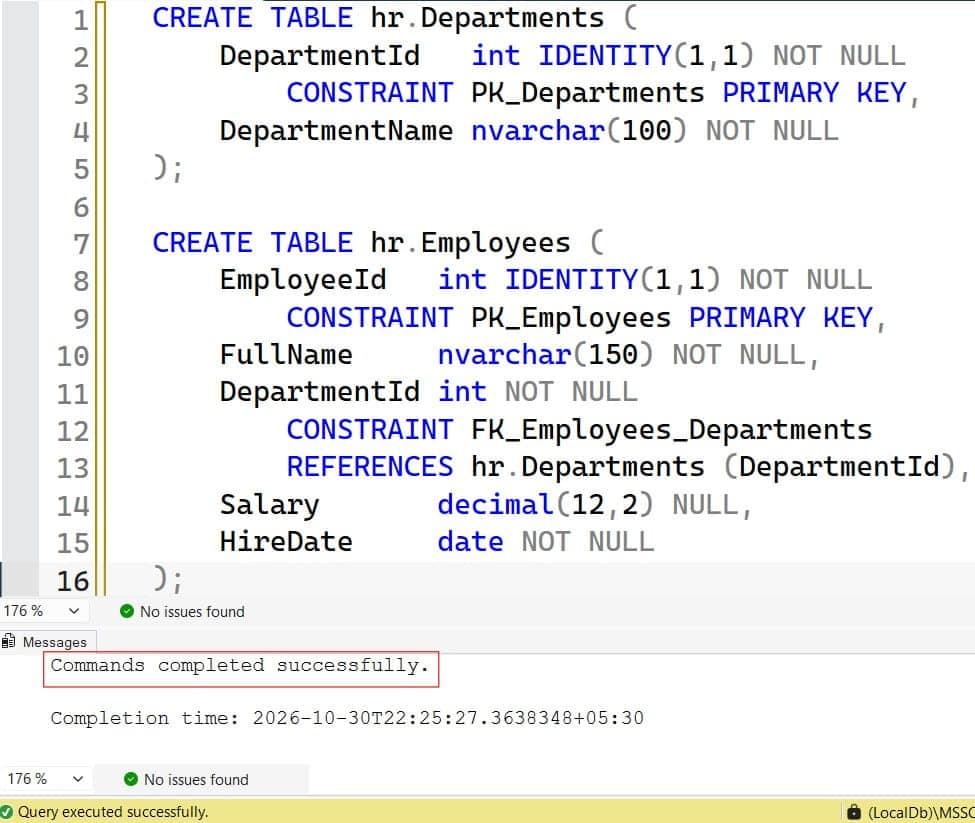
Each employee has a primary key, which uniquely identifies the row, and a foreign key, which links the employee to a department. decimal(12,2) Stores exact money values, while float can introduce rounding errors that make equal salaries look different. See creating a table with a primary key and foreign keys in SQL Server for the basics.
INSERT INTO hr.Departments (DepartmentName)
VALUES (N'Engineering'), (N'Sales'), (N'HR');

INSERT INTO hr.Employees (FullName, DepartmentId, Salary, HireDate)
VALUES
 (N'Maria Lopez', 1, 135000.00, '2021-03-15'),
 (N'James Carter', 1, 135000.00, '2022-01-10'),
 (N'Omar Haddad', 1, 98000.00, '2023-06-01'),
 (N'Dana Brooks', 2, 112000.00, '2020-07-01'),
 (N'Priya Shah', 2, 98000.00, '2023-02-20'),
 (N'Sam Rivera', 2, NULL, '2024-08-12'),
 (N'Leo Kim', 3, 87000.00, '2019-11-05'),
 (N'Nina Patel', 3, 87000.00, '2022-09-19'),
 (N'Ava Reed', 3, NULL, '2024-05-13');
After running the query above, I got the expected output shown in the screenshot below.
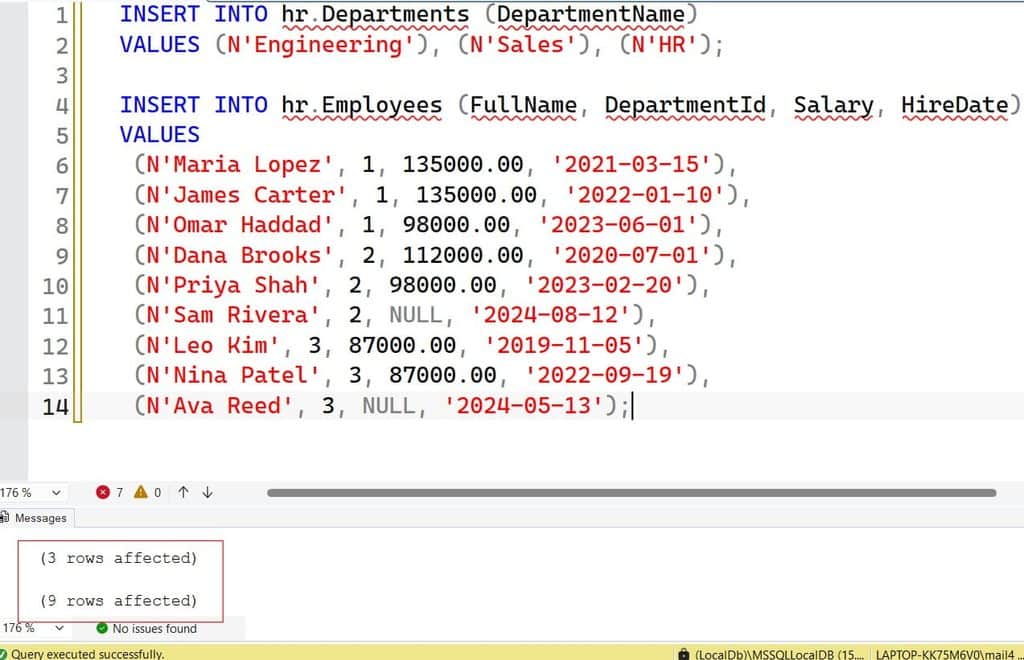
This sample data is safe to copy into a test database. It contains three shared salaries (135000, 98000, and 87000), one pair that crosses departments (Omar and Priya at 98000), and two NULL salaries. Those edge cases are what break real reports.
Pro Tip: In my experience, a test table that includes cross-department matches and
NULLvalues catches most salary-report bugs before they reach an executive dashboard.
Method 1: Find Duplicate Salaries With GROUP BY and HAVING
Start by finding which salary amounts repeat. GROUP BY collapses rows that share a value, and COUNT(*) counts how many rows landed in each group.
SELECT Salary,
       COUNT(*) AS EmployeeCount
FROM hr.Employees
WHERE Salary IS NOT NULL
GROUP BY Salary
HAVING COUNT(*) > 1
ORDER BY Salary DESC;
After running the query above, I got the expected output shown in the screenshot below.
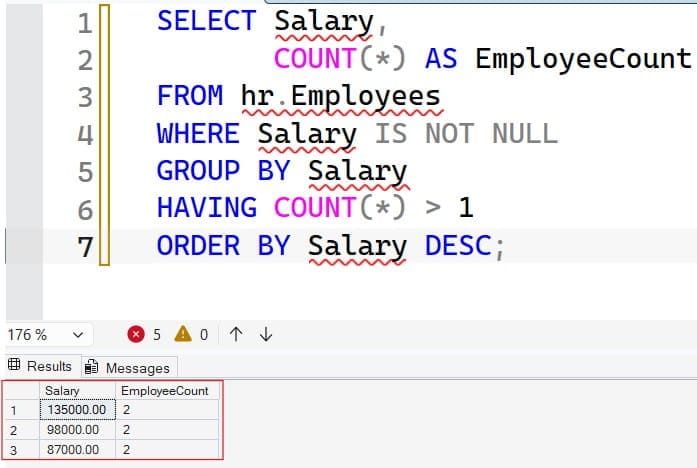
The WHERE clause removes rows before grouping, and HAVING filters groups after counting. That difference matters: you cannot use COUNT(*) in WHERE, because the count does not exist yet. See HAVING vs. WHERE and GROUP BY in SQL Server for the details.
The result shows 135000.00, 98000.00, and 87000.00, each with a count of 2. Without WHERE Salary IS NOT NULL, you would also see a NULL group with a count of 2. GROUP BY treats NULL values as one group, but NULL means unknown, so those employees do not truly share a salary. Read more about NULL behavior in SQL.
This query answers “which amounts repeat,” not “who earns them.” It is the right tool for summary counts and data quality checks. The same pattern appears in how to find duplicate records in SQL.
Pro Tip: I run this summary query first on every new dataset. If it returns thousands of rows, the salary column may hold rounded or default values, and that is worth investigating before anyone reads the results.
Method 2: List the Employees Who Share a Salary With EXISTS
Usually someone wants names. EXISTS checks whether at least one other employee has the same salary.
SELECT e.EmployeeId, e.FullName, e.DepartmentId, e.Salary
FROM hr.Employees AS e
WHERE e.Salary IS NOT NULL
  AND EXISTS (
        SELECT 1
        FROM hr.Employees AS x
        WHERE x.Salary = e.Salary
          AND x.EmployeeId <> e.EmployeeId
  )
ORDER BY e.Salary DESC, e.FullName;
After running the query above, I got the expected output shown in the screenshot below.
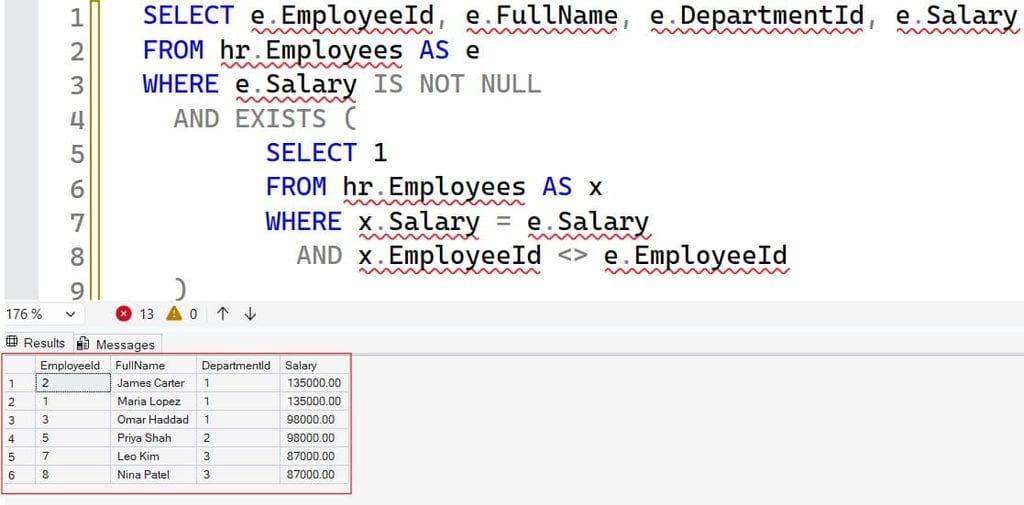
The outer query looks at each employee. The inner query asks, “Is there a different employee with the same salary?” x.EmployeeId <> e.EmployeeId stops a row from matching itself. SELECT 1 is a convention, because EXISTS only cares whether a row exists, not what it contains. The table aliases (e and x) keep the two references apart; see SQL aliases.
This returns six employees: Maria, James, Omar, Priya, Leo, and Nina. EXISTS stops as soon as it finds one match, so it can be efficient with the right index. For a comparison with joins, read JOIN vs. EXISTS.
Pro Tip: I prefer
EXISTSoverINfor this pattern, because it handlesNULLvalues more predictably, and it reads like the business question.
Method 3: Use a Window Function With COUNT OVER
A window function performs a calculation across related rows without collapsing them. Using COUNT(*) OVER (PARTITION BY Salary) adds the group size to every row, so you get the full employee list and the duplicate count in one pass. See window functions in SQL Server, the OVER clause, and PARTITION BY.
WITH Counted AS (
    SELECT EmployeeId,
           FullName,
           DepartmentId,
           Salary,
           COUNT(*) OVER (PARTITION BY Salary) AS SameSalaryCount
    FROM hr.Employees
    WHERE Salary IS NOT NULL
)
SELECT EmployeeId, FullName, DepartmentId, Salary, SameSalaryCount
FROM Counted
WHERE SameSalaryCount > 1
ORDER BY Salary DESC, FullName;
After running the query above, I got the expected output shown in the screenshot below.
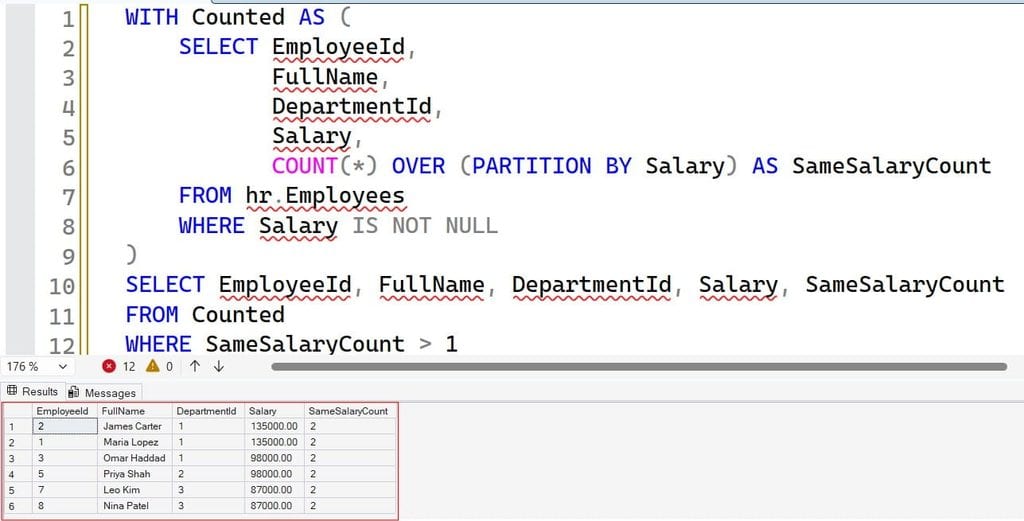
The common table expression (CTE), introduced by WITH, creates a named temporary result. PARTITION BY Salary restarts the count for each salary value. The outer query keeps only rows where the count is greater than one. If you are choosing between a CTE and a temporary table for larger jobs, see CTE vs. temp table.
The advantage of this pattern is flexibility. You can add AVG(Salary) OVER (...), ranks, or percentages to the same query. The cost is a sort or hash operation across the rows, so on a very large table, check the plan.
Pro Tip: I use the window version for reports that need both detail and counts. It avoids joining a summary query back to the base table, which is where accidental duplicates creep in.
Method 4: Pair Employees With a Self Join
Sometimes the business wants pairs: “Maria and James earn the same.” A self join joins a table to itself. See the self join tutorial and the inner join tutorial.
SELECT a.FullName AS EmployeeA,
       b.FullName AS EmployeeB,
       a.Salary
FROM hr.Employees AS a
INNER JOIN hr.Employees AS b
    ON a.Salary = b.Salary
   AND a.EmployeeId < b.EmployeeId
ORDER BY a.Salary DESC, EmployeeA, EmployeeB;
After running the query above, I got the expected output shown in the screenshot below.
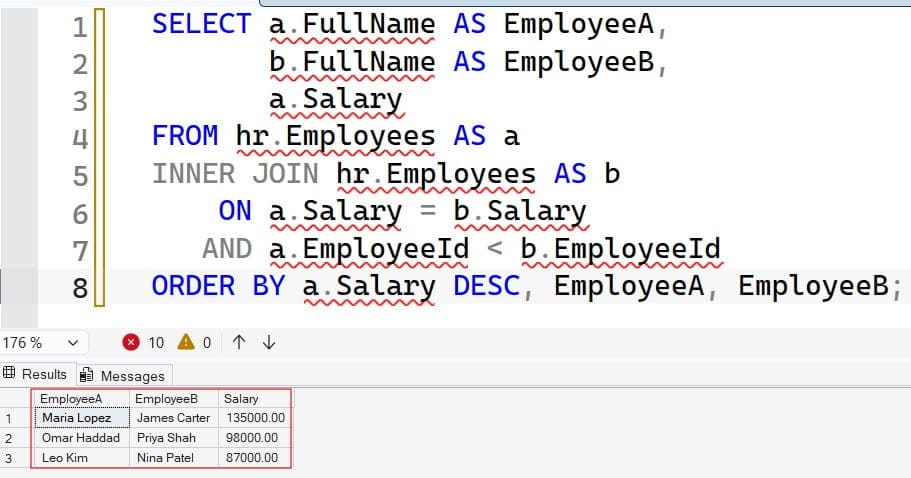
The condition a.EmployeeId < b.EmployeeId is the key. Without it, every pair appears twice (A with B, and B with A), and each employee matches themselves. Using “less than” returns each pair once. NULL salaries never match, because NULL = NULL is not true in SQL.
Be careful with large tie groups. A group of n employees with the same salary produces n × (n − 1) / 2 pairs. Ten people create 45 rows, and 1,000 people create nearly half a million. On a table with a common default salary, this can flood your results and slow the server. Use this method for small groups or after filtering.
Pro Tip: Before I run a self join on production data, I check the group sizes with the
GROUP BYquery. It tells me whether I am about to generate ten rows or ten million.
Find Same Salaries Within a Department
Many questions are really “within the same department.” Add the department to the grouping or partition.
SELECT d.DepartmentName,
       e.Salary,
       COUNT(*) AS EmployeeCount,
       STRING_AGG(e.FullName, N', ') WITHIN GROUP (ORDER BY e.FullName) AS Employees
FROM hr.Employees AS e
INNER JOIN hr.Departments AS d
    ON d.DepartmentId = e.DepartmentId
WHERE e.Salary IS NOT NULL
GROUP BY d.DepartmentName, e.Salary
HAVING COUNT(*) > 1
ORDER BY d.DepartmentName, e.Salary DESC;
After running the query above, I got the expected output shown in the screenshot below.
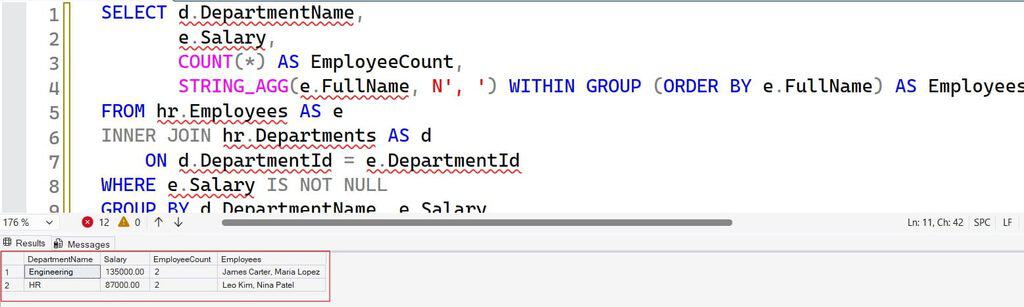
Grouping by DepartmentName and Salary means only people in the same department are compared. Omar and Priya (98000) no longer appear, because they work in different departments. STRING_AGG combines names into one text value, which makes a compact audit report; it requires SQL Server 2017 or later, or Azure SQL. See STRING_AGG in SQL Server.
The result lists Maria and James in Engineering, and Leo and Nina in HR.
Pro Tip: I always ask stakeholders whether “same salary” means company-wide, department-wide, or job-level. The answer changes the query and the conclusions.
Index and Tune the Query
On a few hundred rows, every method is fast. On millions of rows, the plan matters. An index is a structure that helps SQL Server find or order rows without scanning the whole table.
CREATE NONCLUSTERED INDEX IX_Employees_Salary
ON hr.Employees (Salary)
INCLUDE (FullName, DepartmentId);
This nonclustered index keeps salaries in order, so GROUP BY Salary can count neighbors without a separate sort, and EXISTS can seek directly to matching salaries. INCLUDE stores extra columns so the query avoids extra lookups. The trade-off is that each index speeds up reads but slows inserts and updates, and it uses storage. See how to create an index, index best practices, and query optimization tips.
Verify improvements with the actual execution plan and Query Store, which records query performance history. Look for scans, sorts, and spills to disk. Update statistics if the optimizer chooses poor plans after large data loads.
On Azure SQL Database, expensive scans consume DTUs or vCores. A DTU is a blended unit of compute, memory, and I/O, while a vCore is a virtual core model with separate compute and storage choices. Tuning the query is usually cheaper than moving to a larger tier. Do not estimate costs without your region, tier, and usage data.
For heavy reports, run them off-peak or on a readable secondary replica where your service tier supports it, so users are not blocked.
Pro Tip: I compare the logical reads for all four methods on a copy of production data. The winner on my laptop has not always been the winner at scale.
Troubleshoot Common Problems
NULL salaries appear as a group. Add WHERE Salary IS NOT NULL. NULL means unknown, not equal.
Rows that look equal do not match. Check the data type. If salaries were stored as float or text, tiny differences or text formatting can break equality. Use decimal, and see error converting data type varchar to numeric if conversion errors appear.
Employees match themselves. A self join needs a.EmployeeId < b.EmployeeId or <>.
Counts look inflated. A join to another table, such as salary history, can duplicate employees. Filter to the current record before comparing.
The query is slow. Check the execution plan for scans, and consider the index above.
Permission denied. Confirm role membership and the GRANT on the object.
Frequently Asked Questions
How do I find employees with the same salary in SQL Server?
Group by salary and use HAVING COUNT(*) > 1 to find repeated amounts. Then use EXISTS, a window function such as COUNT(*) OVER (PARTITION BY Salary), or a self join to list the matching employees.
How do I find duplicate salaries in SQL?
Use SELECT Salary, COUNT(*) FROM Employees WHERE Salary IS NOT NULL GROUP BY Salary HAVING COUNT(*) > 1. This returns each repeated salary and how many employees earn it.
Why does my query show NULL as a duplicate salary?
GROUP BY places all NULL values into one group. Filter them out with WHERE Salary IS NOT NULL, because unknown values are not truly equal.
How do I find employees with the same salary in the same department?
Group by both department and salary, or use PARTITION BY DepartmentId, Salary in a window function. This compares people only within their own department.
Which method is fastest for large tables?
It depends on your data and indexes. An index on Salary helps GROUP BY and EXISTS, while window functions may need a sort. Compare execution plans and Query Store results on realistic data instead of guessing.
You learned four ways to find employees with the same salary: GROUP BY with HAVING, EXISTS, window functions, and a self join, plus department-level matching and indexing. Treat salary data as sensitive by granting the least access needed, testing with a non-admin user, and using encrypted, audited connections. I hope you found this article helpful.
You May Also Like
- How to delete duplicate records in SQL Server
- DISTINCT vs. UNIQUE in SQL
- SQL Server INSERT INTO SELECT statement
- Table backup in SQL Server
- Subquery vs. join in SQL

After working for more than 15 years in the Software field, especially in Microsoft technologies, I have decided to share my expert knowledge of SQL Server. Check out all the SQL Server and related database tutorials I have shared here. Most of the readers are from countries like the United States of America, the United Kingdom, New Zealand, Australia, Canada, etc. I am also a Microsoft MVP. Check out more here.