
A finance analyst runs a quick query to pull the top earner for a budget review. The query returns one name, but two people share that salary, and a third employee with a NULL salary quietly slipped into the sort. The report goes to leadership, and the next day somebody asks why the second person is missing.
That is the real challenge behind how to find highest paid employee in SQL. The basic query takes one line. Getting it right takes more: handling ties, NULL values, departments, indexes, and the fact that salary is sensitive data. I have seen all of these mistakes in HR reporting databases, in Azure SQL Database as well as SQL Server on virtual machines.
This guide builds a small employee schema, walks through four reliable T-SQL patterns, shows how to rank by department, tunes the query with an index, and locks down access to salary data.
Set Up a Realistic Employee Schema
A schema is a named container for database objects. Using one for HR data lets you grant permissions on the whole group. The tables below use a primary key, a foreign key, and the decimal data type for money.
CREATE SCHEMA hr;This creates the hr schema. Run it in its own batch, because CREATE SCHEMA must be the first statement in a batch.
CREATE TABLE hr.Departments (
    DepartmentId   int IDENTITY(1,1) NOT NULL
        CONSTRAINT PK_Departments PRIMARY KEY,
    DepartmentName nvarchar(100) NOT NULL
);

CREATE TABLE hr.Employees (
    EmployeeId   int IDENTITY(1,1) NOT NULL
        CONSTRAINT PK_Employees PRIMARY KEY,
    FullName     nvarchar(150) NOT NULL,
    DepartmentId int NOT NULL
        CONSTRAINT FK_Employees_Departments
        REFERENCES hr.Departments (DepartmentId),
    Salary       decimal(12,2) NULL,
    HireDate     date NOT NULL
);
After running the query above, I got the expected output shown in the screenshot below.
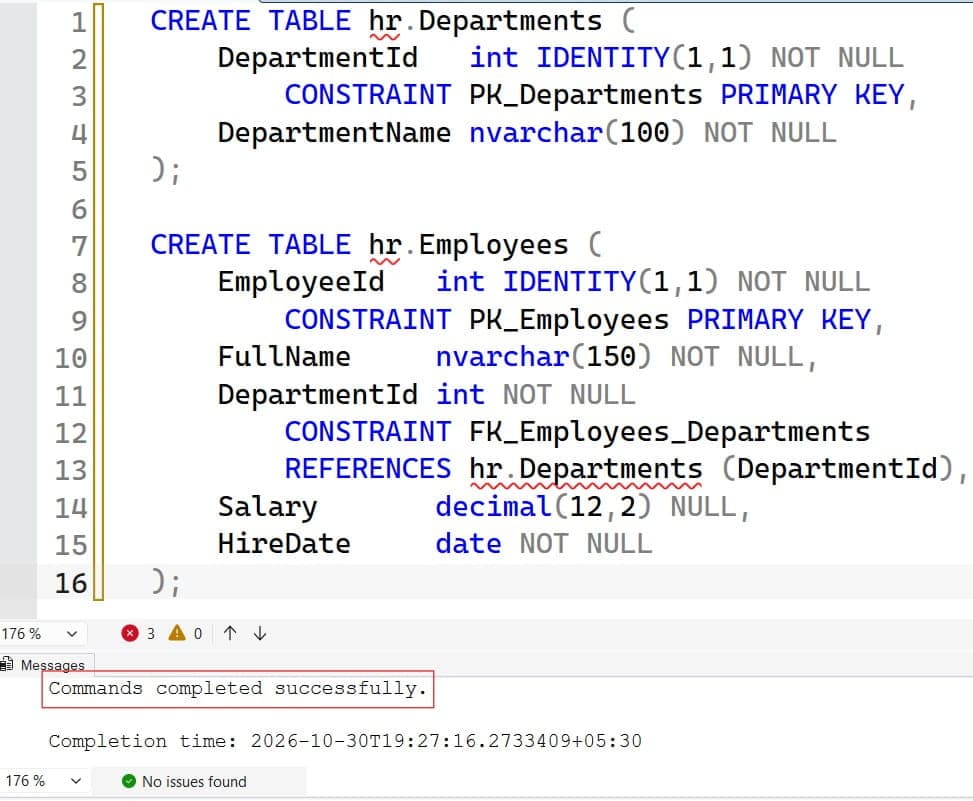
The first table stores departments. The second stores employees, with a primary key that uniquely identifies each row and a foreign key that ties each employee to a department. decimal(12,2) stores exact money values, while float can introduce rounding errors. Salary allows NULL to model unknown values, which matters later.
For table creation basics, see how to create a table with a primary key and foreign keys in SQL Server. Good design choices also appear in SQL database design best practices.
INSERT INTO hr.Departments (DepartmentName)
VALUES (N'Engineering'), (N'Sales'), (N'HR');

INSERT INTO hr.Employees (FullName, DepartmentId, Salary, HireDate)
VALUES
 (N'Maria Lopez', 1, 135000.00, '2021-03-15'),
 (N'James Carter', 1, 135000.00, '2022-01-10'),
 (N'Dana Brooks', 2, 112000.00, '2020-07-01'),
 (N'Priya Shah', 2, 98000.00, '2023-02-20'),
 (N'Leo Kim', 3, 87000.00, '2019-11-05'),
 (N'Ava Reed', 3, NULL, '2024-05-13');
After running the query above, I got the expected output shown in the screenshot below.
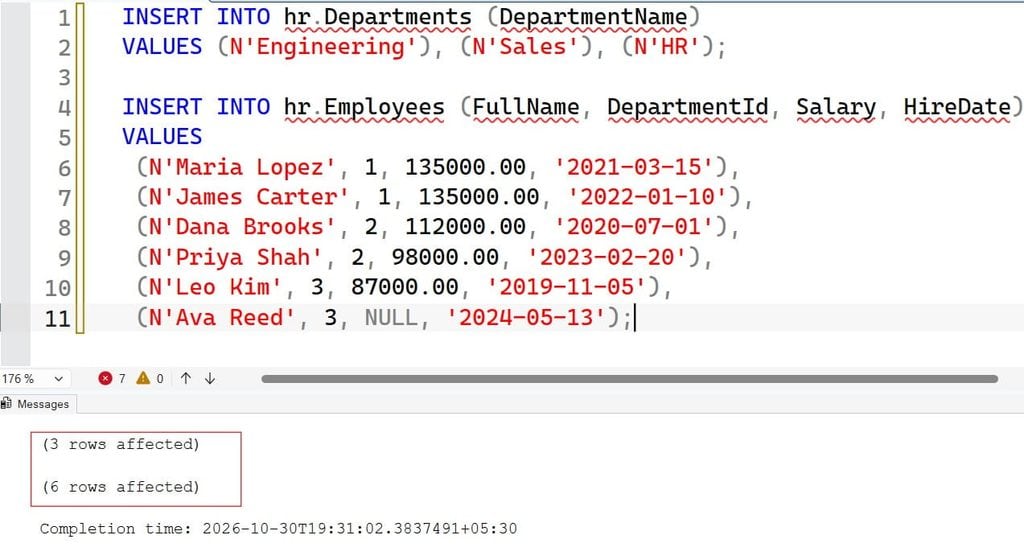
This sample data is safe to copy into a test database. It includes a tie (Maria and James), a NULL salary (Ava), and three departments. Those edge cases are what break real queries.
Pro Tip: In my experience, adding a tie and a
NULLto your test data on day one catches most salary-report bugs before production does.
Find the Highest Paid Employee in SQL With MAX
The most dependable pattern combines MAX with a subquery. A subquery is a query nested inside another query. MAX is an aggregate function that returns the largest value in a column.
SELECT e.EmployeeId, e.FullName, e.Salary
FROM hr.Employees AS e
WHERE e.Salary = (SELECT MAX(Salary) FROM hr.Employees);
After running the query above, I got the expected output shown in the screenshot below.
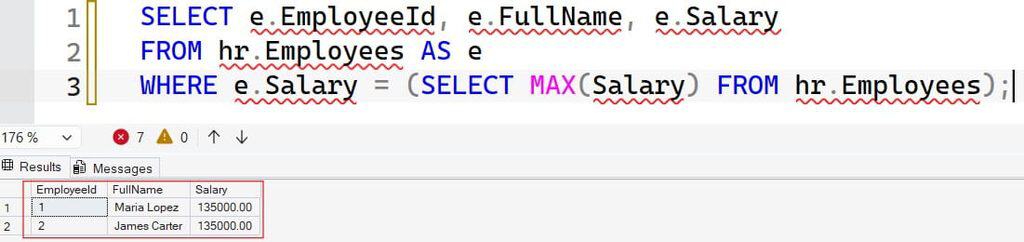
The inner query finds the largest salary, 135000.00. The outer query returns every employee with that salary, so both Maria and James appear. This is the key advantage: it handles ties correctly without extra work. MAX also ignores NULL values, so Ava does not interfere.
Why does this work well? The subquery runs once, and with an index on Salary the engine can find the maximum value quickly. Read more in how to use the MAX function in SQL Server and SQL subqueries. If you are deciding between subqueries and joins for other tasks, see subquery vs. join.
Pro Tip: I use this pattern for audit-style questions, where missing a tied employee would be a data quality problem.
Use TOP and ORDER BY, and Know Its Trap
Many developers reach for TOP. It is short and easy to read.
SELECT TOP (1) FullName, Salary
FROM hr.Employees
ORDER BY Salary DESC;
After running the query above, I got the expected output shown in the screenshot below.
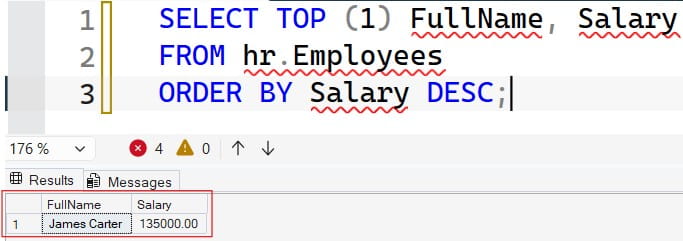
ORDER BY Salary DESC sorts from highest to lowest, and TOP (1) keeps the first row. The trap is that this returns only one of the two tied employees, and which one you get is not guaranteed. SQL Server treats NULL as the lowest value, so in descending order NULL rows sort last, which is why Ava does not appear first here.
To keep ties, use WITH TIES:
SELECT TOP (1) WITH TIES FullName, Salary
FROM hr.Employees
WHERE Salary IS NOT NULL
ORDER BY Salary DESC;
After running the query above, I got the expected output shown in the screenshot below.
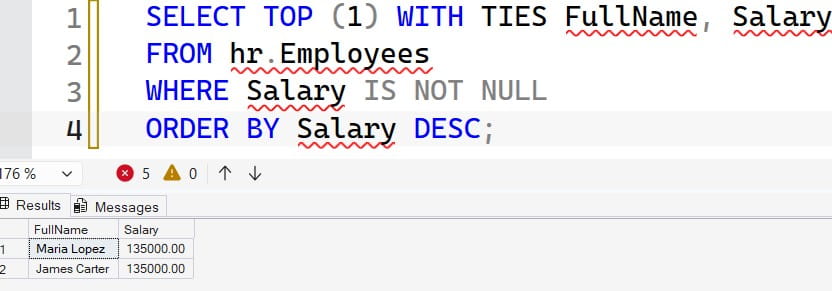
WITH TIES returns every row that matches the last value in the sort, so both 135000.00 salaries appear. It requires an ORDER BY. The IS NOT NULL filter makes the intent explicit. For syntax details, see the TOP clause in SQL Server, ORDER BY, and how NULL values behave.
Pro Tip: I always ask whether a report can tolerate hidden ties. If the answer is no, I never ship a plain
TOP (1).
Rank Salaries With Window Functions
A window function performs a calculation across a set of rows related to the current row, without collapsing them into one. RANK() and DENSE_RANK() assign positions to each row. Learn more in window functions in SQL Server and RANK vs. DENSE_RANK.
WITH Ranked AS (
    SELECT FullName, Salary,
           DENSE_RANK() OVER (ORDER BY Salary DESC) AS SalaryRank
    FROM hr.Employees
    WHERE Salary IS NOT NULL
)
SELECT FullName, Salary
FROM Ranked
WHERE SalaryRank = 1;
After running the query above, I got the expected output shown in the screenshot below.
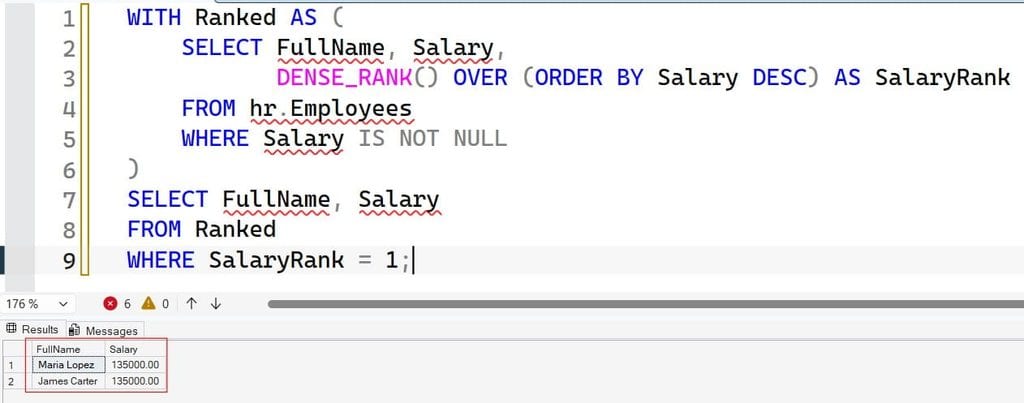
The common table expression (CTE), introduced by WITH, creates a temporary named result. DENSE_RANK() gives tied employees the same rank and does not skip numbers after a tie. That makes it handy for the second or third highest salary: change SalaryRank = 1 to SalaryRank = 2 for the second highest salary, which is 112000.00.
RANK() leaves gaps after ties, so with two employees tied at rank 1, the next rank is 3. ROW_NUMBER() never ties and assigns an arbitrary order among equals, which hides ties. For more about this function, see ROW_NUMBER in SQL Server.
The approach costs a sort over the rows, so on very large tables, make sure supporting indexes exist.
Pro Tip: For “Nth highest” questions, I default to
DENSE_RANK. It matches how people think: “the second highest salary” means the second distinct amount.
Highest Paid Employee in SQL Per Department
Business questions usually ask for the top earner in each group. Add PARTITION BY to restart the ranking inside each department. See PARTITION BY for background.
WITH Ranked AS (
    SELECT d.DepartmentName,
           e.FullName,
           e.Salary,
           DENSE_RANK() OVER (
               PARTITION BY e.DepartmentId
               ORDER BY e.Salary DESC
           ) AS SalaryRank
    FROM hr.Employees AS e
    INNER JOIN hr.Departments AS d
        ON d.DepartmentId = e.DepartmentId
    WHERE e.Salary IS NOT NULL
)
SELECT DepartmentName, FullName, Salary
FROM Ranked
WHERE SalaryRank = 1
ORDER BY DepartmentName;
After running the query above, I got the expected output shown in the screenshot below.
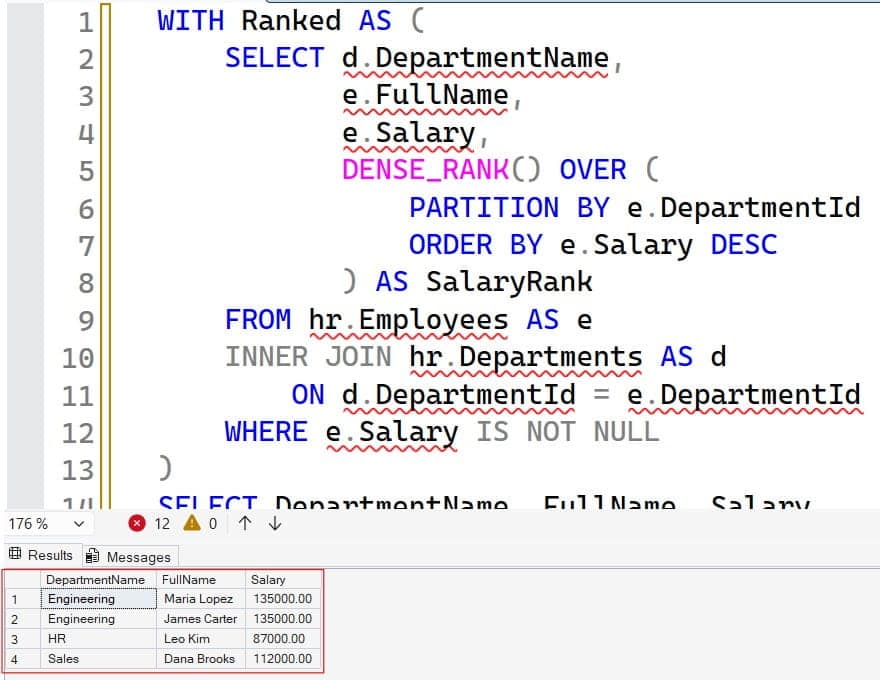
PARTITION BY e.DepartmentId creates a separate ranking window per department. The INNER JOIN brings in the department name; see the INNER JOIN tutorial. The result shows Maria and James for Engineering, Dana for Sales, and Leo for HR.
A common alternative uses GROUP BY with MAX, but that only returns the salary, not the employee. To get names, you must join back to the table or use a window function. Review GROUP BY in SQL Server if you need that pattern.
A caution on joins: if a department can map to several rows in another table, such as a salary history table, a join can duplicate employees. For history tables, filter to the current record first, then rank.
Pro Tip: I check row counts before and after every join in a salary query. If the count jumps, a join is duplicating people and inflating results.
Index the Query for Performance
On a small table, any pattern works. On a table with millions of rows, an index decides whether the query is fast. An index is a data structure that helps SQL Server find rows without scanning the whole table.
CREATE NONCLUSTERED INDEX IX_Employees_Department_Salary
ON hr.Employees (DepartmentId, Salary DESC)
INCLUDE (FullName);
This nonclustered index orders rows by department and then by salary, from highest to lowest. INCLUDE (FullName) stores the name in the index so the query does not need to look up the base table. That supports the per-department query. For the overall maximum, an index on Salary alone can let SQL Server read a single entry.
Indexes have a cost. Each one speeds up reads but slows inserts and updates, and consumes storage. Create them based on real workload, not guesses. Check the actual execution plan before and after, and use Query Store, which records query performance history, to confirm the change helped. See how to create an index in SQL Server, SQL index best practices, and SQL query optimization tips.
In Azure SQL Database, an inefficient scan also consumes DTUs or vCores. Right-sizing compute is a cost issue, and tuning queries is often cheaper than buying a bigger tier. Do not guess about costs without your region, tier, and usage numbers.
Pro Tip: I add indexes for the top five slowest queries, not for every query. A table with eight overlapping indexes usually has slow writes and little extra benefit.
Frequently Asked Questions
How do I find the highest paid employee in SQL?
Use SELECT ... WHERE Salary = (SELECT MAX(Salary) FROM Employees). It returns every employee with the top salary, including ties. Alternatively, use TOP (1) WITH TIES with ORDER BY Salary DESC.
How do I find the second highest salary in SQL Server?
Use DENSE_RANK() OVER (ORDER BY Salary DESC) in a CTE and filter for rank 2. This returns the second distinct salary even if several employees are tied at the top.
What is the difference between RANK and DENSE_RANK?
RANK leaves gaps after ties, so two people at rank 1 push the next person to rank 3. DENSE_RANK does not leave gaps, so the next rank is 2.
How do I find the highest paid employee in each department?
Use DENSE_RANK() OVER (PARTITION BY DepartmentId ORDER BY Salary DESC) and keep rows where the rank is 1. Join to the departments table to show department names.
How do I speed up a slow salary query?
Check the actual execution plan, and add a nonclustered index such as (DepartmentId, Salary DESC) if the plan shows scans. Confirm with Query Store, and watch the write cost of extra indexes.
You May Also Like
- HAVING vs. WHERE in SQL
- SQL self join tutorial
- How to find duplicate records in SQL
- CTE vs. temp table in SQL Server
- SQL cheat sheet
You learned four reliable ways to find the highest paid employee in SQL, how to handle ties and NULL values, how to rank per department, and how to index and secure the query. Treat salary data as sensitive: give people the least access they need, test with a non-admin user, and keep restore-tested backups. I hope you found this article helpful.

After working for more than 15 years in the Software field, especially in Microsoft technologies, I have decided to share my expert knowledge of SQL Server. Check out all the SQL Server and related database tutorials I have shared here. Most of the readers are from countries like the United States of America, the United Kingdom, New Zealand, Australia, Canada, etc. I am also a Microsoft MVP. Check out more here.